Xolvie Resolution Specialist26 Ağustos 2025 13:04
First, make sure that the eSIM you bought works in the place you're going to and that your device can use an eSIM.
Plans that are made for a certain region or country won't work outside of the areas they say they cover.
For your AirAsia line, turn on Data Roaming. Then, restart your phone. If you don't see a connection, go to your network settings and choose a local carrier by hand.
Check the APN settings on your phone, as some Airalo plans need you to enter them by hand.
Tap Settings, then Cellular, then your Airalo eSIM, and finally Cellular Data Network on iOS.
Go to Settings > Network & Internet > Mobile Network > Access Point Names on an Android phone.
If you can't get the eSIM to work, connect to a stable Wi-Fi network, turn off any VPN or proxy, and try activation again. You might also have to delete the eSIM card and then reinstall it.
❗ If the issue persists, share your concerns or file a complaint on Xolvie to connect with others and find support.
Vote
Related Complaints
Airalo ESIM Failed To Work

May 25 3:03 AM
I purchased an Airalo Turkey unlimited data for 3 days eSIM on Sunday, 24 May at around 4 p.m. UK time, but after activa...ting it the eSIM has not worked at all. I am currently in Turkey and, despite following the activation steps, I cannot use any data and the connection never becomes functional. In

Airalo eSIM Did Not Work Properly During My Albania Trip

April 14 11:40 AM
I purchased a one-month, 10 GB eSIM package directly from Airalo’s website for use in Albania between March 20 and April... 4, 2026, and paid approximately $20 for the package. At first, the eSIM could not be installed properly. Because of this, I contacted support through the application, and within t
Airalo eSIM Could Not Be Activated Before My Egypt Trip

March 23 7:22 PM
I purchased an eSIM through Airalo to use during my trip to Egypt, but I was never able to successfully activate the eSI...M. Because of this issue, I requested a refund. However, according to your system policies, the refund was transferred only to my “Air Money” balance instead of being returned dire
Airalo eSIM Activation Failed on iPhone — Error TLS-a

January 3 12:45 AM
I purchased a 5‑day unlimited internet eSIM package from Airalo for use in Istanbul for 18 euros, which I paid for with ...my Visa card. I bought the package yesterday and tried to activate it today on my iPhone 17, but I have not been able to use the service at all. Whenever I try to activate the eSIM
Airalo eSIM Won’t Reinstall Before Travel – Need Immediate Help

November 4, 2025 1:53 PM
I can’t reinstall my Airalo eSIM, and I need it for my travel. I have already tried restarting my phone and checking my ...account, but nothing worked. The eSIM was working perfectly before, and I don’t understand why it suddenly stopped. I don’t want to buy a new one. Please help me.
Airalo eSIM Not Working in Turkey — iPhone User Reports TLS Error
October 25, 2025 4:56 PM
I purchased a 15-day, $9.50 internet package for Turkey through the Airalo app using my iPhone 12 Pro Max. I made the pu...rchase while in Tashkent, Uzbekistan, and took a photo of the QR code for setup. When I arrived in Istanbul at 9:30 a.m. yesterday, I tried to open the Airalo app, but I kept rece
I Report Airalo App Login Failure on iPhone 15 Pro in Turkey

September 24, 2025 4:24 PM
I have been unable to log in to the Airalo app on my iPhone 15 Pro while in Turkey for the past two days. The app keeps ...loading endlessly without opening, and I cannot access any of its features. To troubleshoot, I already tried: Deleting and reinstalling the app Restarting my iPhone However, th
I Bought Airalo Turkey eSIM 3GB Plan but It Never Activated

August 30, 2025 9:05 PM
I purchased the Airalo Turkey eSIM 3GB 30-day package for €6.16, but the eSIM has never worked. Despite carefully follow...ing all installation instructions, restarting my phone, deleting and reinstalling the eSIM profile multiple times, it still refuses to activate. I even attempted troubleshooting on
I Bought Airalo Europe 3GB eSIM but It Never Worked in Bulgaria

August 21, 2025 10:31 AM
On August 16, 2025, I purchased the Airalo “Europe 3GB” eSIM package through the mobile app using my credit card, planni...ng to use it while in Bulgaria. The purchase and installation were completed successfully on my Samsung Galaxy S24 FE, but the internet connection never worked. According to Airalo
I Bought Airalo Greece 2GB eSIM but QR Code Shows Invalid and Doesn’t Work

August 18, 2025 2:18 PM
I purchased a 2GB eSIM package valid for 15 days from Airalo to use on the island of Samos, Greece (Order No: 62358907).... However, when I tried to activate the eSIM by scanning the provided QR code, I immediately received the error message: “This code is no longer valid.” Because of this, I have been
I Bought Airalo eSIM for Albania but Got No Signal and Can't Access the App

July 29, 2025 12:29 PM
About five hours ago, I purchased an eSIM data package for Albania through the Airalo app. The payment was processed suc...cessfully, but once I arrived in Albania, I couldn’t use the service at all. I’m using an iPhone 14 Pro, and the phone shows “No Service” with zero signal—completely unusable. Int
I Paid for Airalo eSIM But Can’t Activate or Reach Customer Support

July 17, 2025 1:50 PM
On July 16, I purchased an eSIM from Airalo, but I have been completely unable to activate it. Although the payment was ...successfully deducted from my account, the eSIM has never connected to any network. I’ve used Airalo many times before without issues, so I trusted the service. However, this time
I Paid for Airalo eSIM for Switzerland but It Never Worked or Connected

July 16, 2025 4:20 PM
I purchased an eSIM from Airalo to use during my trip to Switzerland, expecting seamless connectivity. Unfortunately, de...spite following all setup instructions and seeing everything appear normal on my phone, the eSIM never provided any internet access. It showed signal bars, but there was absolutely
I Activated My Airalo eSIM but Mobile Data Won’t Work After Arrival

June 26, 2025 4:31 PM
I purchased an eSIM via the Airalo app, followed all the setup instructions, and completed the installation successfully... before traveling. Everything appeared fine during the initial setup, and I made sure to activate the eSIM as soon as I arrived in my destination country. However, despite the sign
I Activated My Airalo eSIM But It Doesn’t Work

May 22, 2025 5:37 PM
I purchased an Airalo eSIM and followed every single instruction they provided. They listed three different setup altern...atives—I carefully tried all of them. Not one of them worked. My eSIM never connected to any network, and I was left without service the entire time. I’m extremely disappointed and
I Paid for Airalo Cyprus eSIM but Got No Internet and No Refund

May 17, 2025 2:58 PM
I purchased an Airalo eSIM plan to use mobile data in Northern Cyprus, paying ₺17 for 10 GB. I followed all the setup in...structions exactly as provided, step-by-step, and double-checked the configuration. Despite doing everything correctly, the eSIM never worked—not even once. I received absolutely n
I Bought Airalo eSIM for Cyprus but Got No Signal or Internet Anywhere

May 17, 2025 10:42 AM
I purchased an Airalo eSIM for use in Cyprus, expecting to stay connected throughout my trip. Despite activating the eSI...M properly and ensuring that all international roaming settings were turned on, the internet never worked—not even once. My friend, who also bought the same 15-day Airalo plan, had
I Bought Airalo eSIM for France but It Never Worked

May 16, 2025 12:34 AM
Hello. On May 11, 2025, I purchased a 2GB Airalo eSIM package for France for $6. My spouse bought the exact same package... as well. Today, after arriving in France, we spent hours trying to get the internet working on both of our devices. Unfortunately, despite following all the setup steps, the eSIM
I Bought 3 Airalo France eSIMs but None Worked

May 16, 2025 12:23 AM
Hello. My spouse and I have used Airalo before, but this time we are extremely disappointed. We purchased Airalo eSIMs f...or our trip to France and despite trying everything, we couldn’t get them to work at all. We followed every instruction carefully and spent hours troubleshooting, yet the internet
I Bought Airalo 3GB for Üsküp but Got No Internet

May 15, 2025 10:53 AM
Hi there. On May 10th, I purchased a 3GB Airalo data plan to use during my trip to Üsküp. I followed every single instru...ction step-by-step and activated everything exactly as directed. But despite all that, I was never able to access the internet—not even once. I contacted customer support hoping t
I Bought an eSIM from Airalo but It Didn’t Work and I Can’t Get Any Support

April 21, 2025 2:06 PM
Hello, I recently purchased an eSIM through the Airalo mobile app and carefully followed all the instructions provided.... Despite doing everything exactly as directed, I was never able to get the line to work. I spent an entire week trying multiple times to activate it, but nothing worked. What make
I Bought an Airalo eSIM for Northern Cyprus but It Won’t Activate and Support Is Useless

April 20, 2025 10:24 AM
I am extremely frustrated with Airalo. I purchased a package specifically for Northern Cyprus, but no matter what I trie...d, the eSIM never activated. It’s a complete waste of money and an incredibly disappointing experience. I reached out for help through WhatsApp and through the app’s support featu
Airalo South Asia Package Not Working
April 15, 2025 3:25 PM
I recently bought a South Asia package from Airalo, but sadly, it hasn't functioned at all since I activated it. I dilig...ently adhered to all the instructions provided via the Live Chatbot—activating airplane mode, restarting the phone, and then deactivating airplane mode again—repeatedly. Unfortunat
I Bought the Airalo South Asia Package but It Won’t Activate and Need a New eSIM
April 15, 2025 3:15 PM
I am extremely frustrated with my experience using Airalo. I purchased the South Asia package and followed every single ...instruction carefully to activate it. I even tried the additional troubleshooting steps suggested by the live support bot, such as turning airplane mode on and off and restarting m
I Bought Airalo 3GB for Serbia but eSIM Didn’t Activate on My iPhone 14 Pro

April 3, 2025 9:35 AM
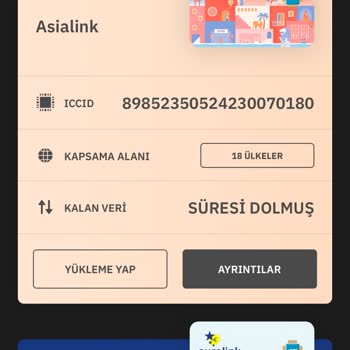
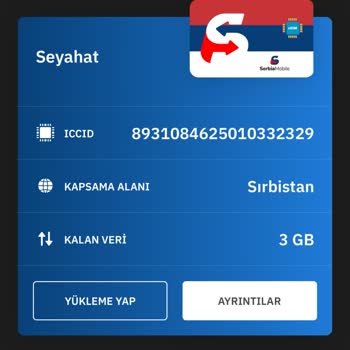
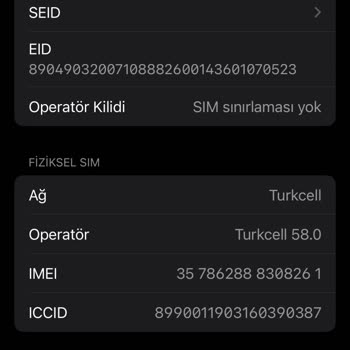
I purchased a 3GB Airalo eSIM package for Serbia and followed all the setup steps exactly as instructed. However, the eS...IM never activated on my iPhone 14 Pro. The issue seems to be with the ICCID number—my phone still displays the ICCID from a previous Asia-based package, and there’s no way to upda

Airalo
View All Complaints