Xolvie Resolution Specialist6 Ocak 2025 07:59
If you notice any unauthorized charges on your Steam account, act swiftly to recover your funds and protect your account.
Log in to your Steam account, go through your purchase history, and look for any odd transactions. To report the problem, go to Steam Support (https://help.steampowered.com) and select "I have charges from Steam that I didn't make". Provide specific information on the charges to help the investigation.
Next, contact your bank or credit card company to report the illegal transactions. They can walk you through challenging the charges and maybe demanding a chargeback.
Keep in mind that chargebacks can result in Steam account restrictions, so contact Steam Support first. You can contact Steam help through their official website or the community help forums.
To increase security, reset your Steam account password and use Steam Guard two-factor authentication.
Scan your computer for malware and make sure the email address associated to your Steam account is secure.
If you have experienced a similar issue, please feel free to share. You can also file a complaint on Xolvie.
Vote
Related Complaints
Steam Card Payment Without My Permission

August 15 11:15 PM
On August 15, 2026, at around 8:58 PM, a $100 USD transaction was made on my VakıfBank credit card ending in 2016, and i...t appears in my statement with the description “WL Steam Purchase.” I did not make this purchase, I did not use Steam at that time, and I did not authorize any subscription, member
Steam Charged Me Twice for the Same Game Purchase

June 18 4:32 AM
On June 17, 2026, at approximately 2:58 PM, I noticed that my Steam account was charged a second time for the game "RV T...here Yet?" in the amount of $1.49. I had already purchased this game on Sunday and completed the payment successfully at that time, so only a single charge should have been applied
I Face Multiple Unauthorized Steam Transactions and Need a $435 Refund

May 28 8:34 AM
On May 27, 2016, multiple transactions in varying amounts were made through Steam without my knowledge or authorization,... resulting in a total of $435 being charged to my account. None of these purchases were made by me, and I did not provide consent or approval for any of the transactions. As soon
I Was Scammed After Buying Steam Account Online

April 27 6:45 PM
About one month ago, I purchased a Steam account through Itemsatış from a seller named “melihhataileri” for $30. Just fo...ur days after the purchase, the account was taken back from me, and I completely lost access. I am now unable to log in to the Steam account in any way. As soon as I realized the
Steam Wallet Not Credited and No Refund After Debit Card Charge

March 28 1:23 AM
On March 23, 2026, at 11:27 PM, I added $100 to my Steam Wallet using my Akbank debit card. Although the charge appears ...to have been successfully processed on my card, the funds were never credited to my Steam Wallet, and they have also not been refunded back to my bank account. After experiencing
Unauthorized Steam Charge of $25 on My Credit Card

March 26 8:05 AM
On March 24, 2026, a charge of $25 was made to my credit card through Steam without my knowledge or authorization. In my... banking app, this transaction appears as “steamgames.com 4259522.” I did not make any purchases on Steam on that date and have no knowledge of this charge. I am requesting a full
Unauthorized Steam Charges on My Credit Card - I Need a Full Refund

November 15, 2025 9:52 PM
On November 13 and November 15, 2025, four unauthorized transactions were made from my credit card to steamgames.com. Th...e amounts were $2.7 (November 13), and $25, $10, and $25 (November 15). I have no membership or account on this site, and I have never made such transactions before. My card was al
Steam EA Play Unauthorized Charge After Stolen Card - Refund Request

November 12, 2025 6:11 PM
On November 12, 2025, an annual EA Play subscription was purchased through Steam without my knowledge, and my credit car...d was charged $39.99. Because my card was stolen, I immediately closed it, and I definitely did not make this transaction. The Steam invoice number for the transaction is: 37448908
Steam Wallet Balance Missing After $20 Payment, Only $10 Credited

September 18, 2025 9:12 PM
Today, I attempted to load funds into my Steam Wallet for the first time. During the process, the balance was held, neve...r credited to my account, and I later canceled the transaction. However, my money was not refunded, and I was unable to create a refund request. Despite trying multiple times, I co
My Bank Card is Blocked After Steam Purchases And Support Ignores Me

June 18, 2025 7:43 PM
I am absolutely enraged with Steam! My bank card has been blocked as a direct result of making purchases on your platfor...m. I immediately tried to get help by opening a support ticket with Steam, but to my utter disbelief, they closed it after just five minutes without offering any solution whatsoeve
My Steam Account Was Hacked Unexpected Item Purchase

June 17, 2025 1:37 AM
I am absolutely outraged with Steam! My account was used to purchase a "Pikselli Dragonus Decoration" item from the Stea...m Community Market for $9.81, completely without my knowledge or authorization. This transaction is absolutely not mine, and to make matters worse, I never received any notificatio
My Steam Account is Blocked Due to a Chargeback I Didn't Make

June 14, 2025 3:11 PM
I am absolutely outraged with Steam! On March 20, 2025, I made a purchase using my personal card through the Steam appli...cation. Now, out of nowhere, I've received a "chargeback" notification from Steam, and my account has been temporarily blocked because of it. I cannot understand why I'm facing thi
I Still Haven’t Received My Refund from Steam After a Month

May 21, 2025 3:58 PM
I made a purchase on Steam, but decided to return the product and requested a refund on April 23. Steam processed my req...uest and marked the refund as completed. However, today marks nearly a full month and ₺417.30 has still not been credited back to my bank account. I’ve contacted Steam support and
Steam Charged Me Without an Account or Consent—I Demand a Refund

May 19, 2025 5:17 PM
I have absolutely no connection to Steam—no account, no login history, no activity—and yet on May 19, 2025, between 08:2...3 and 08:25, two unauthorized charges were made to my bank account: one for $25.38 and another for $57.94, totaling ₺3,326.53. I received no password request, no confirmation emai
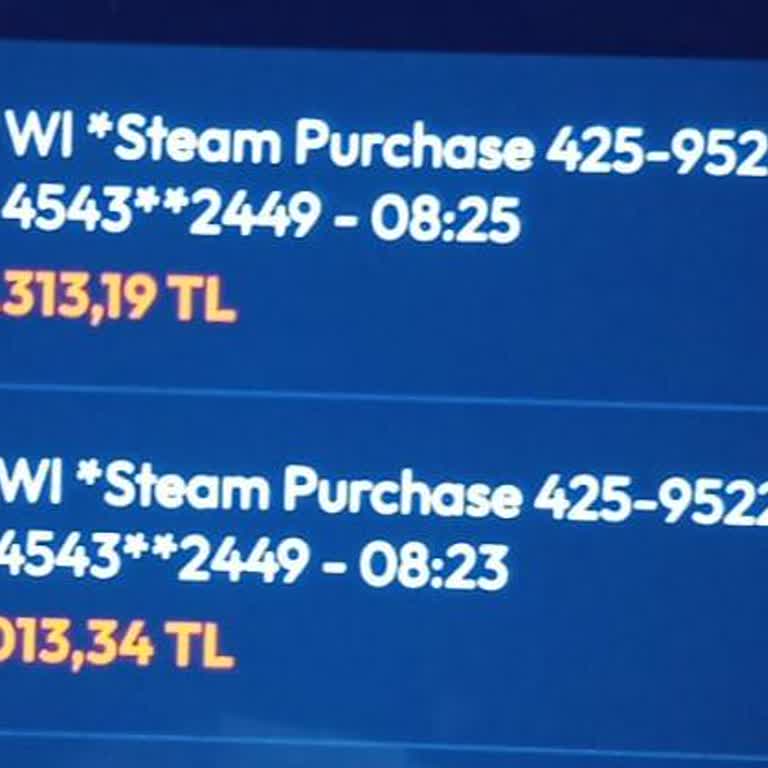
Steam Withdrew From My Debit Card Without My Permission or Any Purchase Record

April 24, 2025 7:04 PM
My debit card was registered for purchases on my Steam account. The system withdrew $50 from my bank card without my kno...wledge, and according to the bank, it attempted another withdrawal immediately after but failed due to insufficient funds. This was outright theft. I never authorized these transac
I Lost ₺45.45 from My Steam Wallet to Unauthorized Dota 2 Item Purchase

March 30, 2025 1:38 AM
I'm incredibly disappointed with Steam’s lack of protection in a recent breach of my account. My Steam Wallet, which had... ₺45.45, was drained when someone purchased a worthless Dota 2 item worth only $0.03. I have never even played Dota 2, so this purchase makes no sense. Even worse, Steam completed
I Can’t Access My Steam Account After Phone Change and Get No Support Response

March 29, 2025 8:45 PM
Hello, I recently changed my phone and, as a result, lost all the saved data linked to my Steam account. Since then, I h...aven’t been able to log back in. I followed the proper recovery process and reached out to Steam Support through the account recovery section. I submitted every piece of requested
I Paid for FC 25 Points on Steam but Didn’t Receive My Purchases

March 29, 2025 2:57 PM
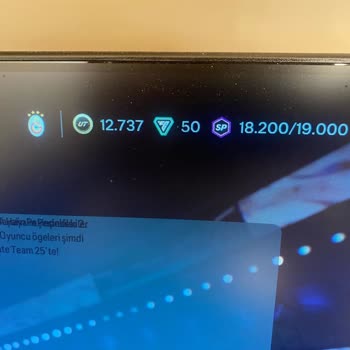
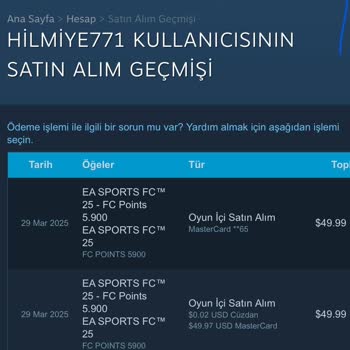
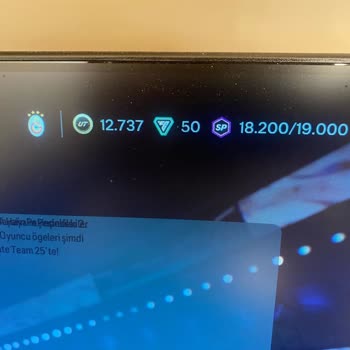
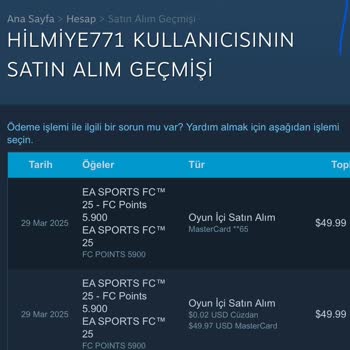
I recently made two in-game purchases on Steam for FC 25—one for 49.97₺ and another for 49.99₺ to buy FC Points—but neit...her of them was delivered to my account. The payment was processed successfully, yet the content I paid for never arrived. My money is essentially gone, and I’ve received nothing i
I Can’t Recover My Stolen Steam Account and Steam Support Won’t Respond

March 29, 2025 1:23 PM
My Steam account was stolen, and despite providing all the necessary information to Steam Support—including my card deta...ils, purchase history, and anything else they might need to verify my ownership—I have received no response. I submitted a ticket through their official support system and included
SteamGames.com Charged Without My Consent – I Demand a Full Refund

March 29, 2025 12:54 AM
On March 28, 2025, a charge of $100 (₺3904) was withdrawn from my account under the name SteamGames.com, despite the fac...t that I never downloaded their platform, created an account, or made any purchases. I have absolutely no affiliation with this service, and yet my money was taken without permissi
I Lost My Skins on Trade.GG After Fake Steam Support Message and Got No Help

March 28, 2025 10:06 PM
Hello, I traded some CS:GO skins on Trade.GG, which I trusted because it's a sponsor of the CS team NAVI. After completi...ng the trade, I received what appeared to be a message from “Steam Support” telling me that I had to send my entire CS inventory to a friend, or my items would be deleted. They sai
I Lost Money on Steam After Unauthorized Login and Got No Help from Support

March 28, 2025 2:54 AM
Someone accessed my Steam account without my permission, and I had ₺20 in my wallet at the time. That money was used to ...purchase and trade items in DOTA 2 — a game I have never even installed, let alone played. I immediately reached out to Steam Support to report the unauthorized activity and opened
I Can’t Log Into My Steam Account Without Mobile App Access on My Phone

March 23, 2025 11:42 AM
I’m completely locked out of my Steam account just because I don’t have the Steam mobile app installed on my phone right... now. I’m trying to sign in from my computer, and despite knowing my password, email, and the phone number linked to the account, Steam still won’t let me access it unless I confir
My Steam Account Was Stolen

March 22, 2025 8:44 PM
My Steam account got taken, and I’ve been working on getting it back for the last four days. I quickly reached out to St...eam Support and provided the receipts for the games I had bought earlier as evidence of ownership. Unfortunately, I have not received any useful or comforting reply. I had hoped fo
Steam Banned My Account After Refund—I Didn’t Commit Fraud

March 21, 2025 7:13 PM
I’ve been unfairly restricted from accessing my Steam account, and I believe this is due to a system error. I purchased ...a game, and it was refunded within 3–4 days—something I had no control over. Shortly after, my account was banned for alleged fraud, which is completely false and extremely frustra

Steam
View All Complaints