Xolvie Resolution Specialist14 Nisan 2026 12:40
If ReelShort billed your card unexpectedly and you want to stop future charges,
Cancel the subscription the right way;
• Important:
– ReelShort subscriptions are usually managed via App Store or Google Play, not inside the app
• Cancel based on your device:
– iPhone → Settings → Apple ID → Subscriptions → Cancel
– Android → Google Play → Payments & Subscriptions → Cancel
• Key tip:
– Deleting the app does NOT stop billing
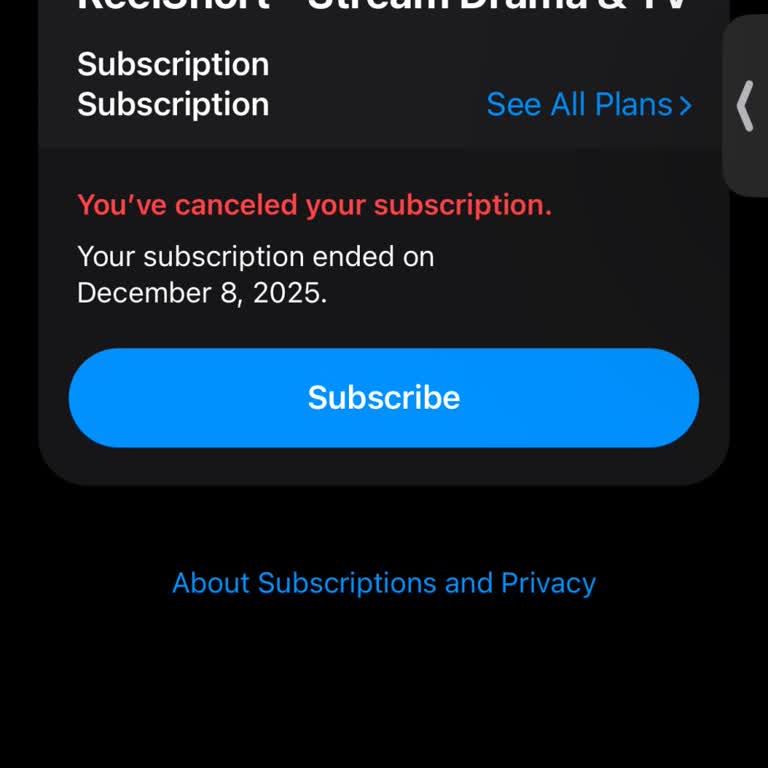
Verify cancellation;
• Make sure:
– Status shows “Canceled” or “Expires on [date]”
– You receive a confirmation email
• Why:
– Without confirmation, charges may continue
Check for multiple accounts;
• Sometimes charges happen because:
– You subscribed with a different email/account
– Family/shared payment methods are used
• Fix:
– Check all accounts linked to your card
Stop payments directly (if needed);
• PayPal:
– Cancel automatic payments
• Bank/card:
– Ask to block ReelShort charges
If you’re struggling with a similar issue, you’re not alone. Share your concerns or file a complaint on Xolvie to connect with others and find support.
Vote
Related Complaints
ReelShort Made an Unauthorized Charge and Ignored My Refund Request

September 11 5:07 PM
I am writing to report an unauthorized charge made by ReelShort to my bank card and to request an urgent resolution. On ...11/09/2026, an amount of 387.59 EGP was taken directly from my card with the description “Reelshort”. I did not purchase any subscription, I did not select or confirm any plan, and
ReelShort VIP Subscription Charge: Cancel Autopay & Refund

September 10 8:40 PM
I am writing to report unauthorized VIP subscription charges related to the Reel Short / ReelShortW service being debite...d from my credit card without my consent. On 04/09 the first charge for this VIP subscription appeared on my card, even though I never requested or authorized this purchase. On 09/
Fix ReelShort Unauthorized Charge

September 10 4:01 AM
I am using the ReelShort application on my Android phone and today, September 9, an unauthorized subscription charge was... made to my account. According to my bank statement, a digital transaction was processed for ReelShort on September 9, 2026 for 22.46 Peruvian soles. I did not authorize this subsc
Can't Cancel My ReelShort Subscription But Still Being Charged, Even Deleted App

September 9 2:52 PM
I purchased a ReelShort in-app VIP subscription on 17 August and since then my card has been charged repeatedly, even th...ough I am unable to cancel the subscription. After the initial purchase, I noticed three additional charges of 32.99 AUD each on 23 August, 30 August and 6 September for ReelShort
ReelShort Unauthorized Charges After Cancellation – Request Full Refund

September 6 12:34 AM
I canceled my ReelShort subscription on 20 October 2025. At the time of cancellation it was a weekly subscription that c...ost around 6–7 dollars. Despite this cancellation, ReelShort has been charging me every week 24.99 dollars. Without my approval or any new subscription, these weekly charges have c
Reelshort Charged My Card Without Authorization

September 5 1:52 PM
On September 5, 2026, my card linked to my Garanti Bank account was charged approximately $7 by Reelshort without my kno...wledge or authorization. I have never approved any purchase or subscription through the Reelshort app. This unauthorized transaction has caused me inconvenience, and I do not unde
ReelShort $29.99 Charges After Cancellation: Refund Request

September 5 6:55 AM
I had a subscription with Reelshort and cancelled it, yet I am still being charged $29.99. Despite cancelling, they have... now taken this amount three times, including a charge today, even though I am no longer using or wishing to use the service. I am requesting a full refund of all three unauthorize
Reelshort Charges Customer $12.99 After Subscription Cancellation

September 3 2:56 AM
I had previously unsubscribed from the Reelshort subscription, yet today I received a bank notification that an amount o...f GHS 156.65 (12.99 USD) was deducted from my account without my consent. I had not requested any new subscription or purchase at the time of this transaction, and I was not using
ReelShort Continues Debiting Credit Card After Confirmed Subscription Cancellation

September 2 12:42 PM
I have repeatedly cancelled my ReelShort subscription, which is paid directly by credit card, and contacted you several ...times to request confirmation of the cancellation. Despite this, money has continued to be debited from my account. My ReelShort user ID is 13213598. I first requested the cancella
ReelShort Weekly Subscription Not Working After $11.99 Payment

September 1 9:54 PM
I live in the United States and recently purchased a weekly package on Reelshort. On 8/31, $11.99 was charged to my card... for this weekly subscription. Despite this payment, I am not able to watch a full movie or series continuously. After I finish an episode and want to move to the next one, the app
ReelShort Refund To Bank Card

September 1 8:05 PM
For the past four weeks I have been charged 29.99 every Tuesday at around 2:30 for ReelShort on my mobile device, even t...hough I have never subscribed to any ReelShort service. These payments appear directly on my card, not through any app store such as Apple App Store or Google Play Store. Since I n
ReelShort Charged Me for a Second Subscription I Never Signed Up For

September 1 8:00 PM
I am an Advisor subscriber to ReelShort through the Apple App Store, paying $19.99. In addition to this, I have discover...ed that I am also being charged $9.99 twice a week for something listed as “Reelshortw” through the web, which I never knowingly signed up for. These unwanted Reelshortw web charge
Reelshort Charged Unauthorized Subscription to Vodafone Bill

September 1 5:20 AM
I received an SMS at 4:38 a.m. stating that a subscription fee of approximately $7 for the Reelshort app had been charge...d through the Google Play Store to the Vodafone line I use, even though I have never purchased or authorized any subscription to Reelshort. I was completely unaware of this subscri
Reel Short Charged My Paycell Card Without Authorization

September 1 12:28 AM
On August 31, 2026, at 11:07 p.m., a payment of approximately $24 was charged to my Paycell card by a website called “Re...el Short” without my knowledge or authorization. I have no membership, subscription, purchase, or other transaction with this website, and I have never provided my card details to
Recurring ReelShort Charges With No VIP Subscription

August 31 9:51 AM
I had a ReelShort subscription that I canceled on December 16, 2025, yet I recently realized that I have still been char...ged $29.99 on a weekly basis despite not having an active subscription. In my transaction history there are separate $29.99 charges on July 26, 2026 and on August 7, 14 and 22, 202
I Canceled My ReelShort Subscription but the App Kept Charging My Credit Card $89.97

August 30 11:05 PM
I am writing regarding unauthorized charges from ReelShort on my credit card, despite cancelling my weekly subscription ...within the first week of use. I cancelled the subscription around 15 November and did not give any further consent for renewals or additional payments. Although the subscription wa
ReelShort Unauthorized Charges From A Canceled Subscription

August 30 9:31 AM
I had a subscription with Reelshort which I canceled through my Apple ID, inside the app, and in every other way I could... find. Despite this, Reelshort has continued to charge my card directly, not through the Apple App Store. I first canceled my subscription about three months ago, yet I have still
Problems With Canceling Weekly ReelShort Subscription

August 29 5:00 PM
I purchased a weekly ReelShort subscription on 19.08.2026 from Germany, paying with my Visa Debit Card via my wallet. On... the same day I tried to cancel, but due to technical problems I was not able to manage the subscription myself. My UserID for this purchase is 1327105***. I watched a ReelShort vi
Unauthorised Money Deducted From Account - ReelShort

August 29 4:17 AM
I recently discovered an unauthorized charge from ReelshortW on my bank card. On 28 August 2026 an amount of R216.66 was... debited from my account with the description “ReelShortW-1355412820056890280”, even though I did not approve or authorize any payment on that date. In the past I used ReelshortW v
ReelShort VIP Charged After Cancellation – Refund

August 28 9:44 AM
I am using the ReelShort VIP service in Poland. About a week ago I cancelled my VIP subscription, but on 27.08.2026 an a...mount of 76,28 PLN was still taken from my bank account by “ReelShortW-1113488671”, as shown on my Erste Bank transaction screenshot. After noticing this, I contacted ReelShort sup
Reelshort Attempts Unauthorized Charges After $1 Purchase

August 28 1:10 AM
Today, I purchased a $1 package through the Reelshort app for ad-free use. Although the service was clearly displayed as... costing $1 at the time of purchase, Reelshort subsequently attempted to charge approximately $4 from both my Vodafone Pay mobile payment account and my Paycell card ending in 51**
ReelShort VIP Charges Continue After Apple Subscription Cancellation

August 26 5:21 PM
I am using the Reelshort app with a weekly VIP subscription purchased through the Apple App Store. On 2 November 2025 I ...cancelled the VIP subscription in my Apple account and I also checked directly in the application that it was no longer active. Despite this, charges for the VIP subscription have
Refund Payments of ReelShort - Continuation Of Charges After Successful Cancelation
August 25 12:37 PM
I had a ReelShort subscription through Apple that I canceled on July 7. Despite the cancellation being successful, I lat...er realized I was still being charged weekly by ReelShort. Between July 7 and August 21 I was overcharged a total of about 150 USD, and I have bank statements and receipts clearly
ReelShort Charged After Account Deletion

August 25 12:05 PM
I deleted my Reelshort account but I was still charged for the weekly VIP subscription afterwards. On August 22, 2026, I... was charged 76,99 R$ for a Reelshort weekly VIP, even though my account was already deleted and I was no longer using the service. My request is that you immediately cancel any ac
Unable to Access Or Cancel Subscription On ReelShort

August 20 1:09 PM
I have been repeatedly charged for a ReelShort subscription even though I cannot find or access any active subscription ...on my account. So far there have been three separate ReelShortW charges taken via Apple Pay from my Hong Kong‑registered payment method, on 1 August 2026 and 15 August 2026 (and on

ReelShort
View All Complaints