Testora showed small fees then billed more later, how can I dispute the charge?
104 Views
If Testora showed a small fee but later charged a larger amount, you can dispute the charge by following these steps:
Check the transaction details first;
• Open your bank or credit card statement
• Look for:
– Merchant name (Testora or similar billing name)
– Exact charge amount
– Transaction date
• Take screenshots of the charges
Review the payment page or confirmation email;
• Check if the site mentioned:
– Trial fees
– Result unlock fees
– Automatic subscriptions
• If the final price was not clearly shown, screenshot the page as evidence
Contact Testora support;
• Send a refund request and ask for clarification
• Include:
– Your registered email
– Charge amount and date
– Screenshot of the payment
• Ask them to cancel any active subscription
Dispute the charge with your bank;
• Request a chargeback and explain that:
– The website initially displayed a smaller fee
– A larger or unexpected charge appeared later
• Provide screenshots and payment proof
If Testora refuses to refund the extra charge or keeps billing you, consider filing a complaint on Xolvie to escalate the issue and warn other users.
I am writing regarding repeated unauthorized charges on my personal American Express card ending in 3010 under the descr...iption “APLPay TESTORA-IQ / TESTORA-IQ-TE WILMINGTON DE.” I have never knowingly signed up for any service or subscription with this company and it does not appear anywhere in my A
I completed a one-time IQ test with Testora, which clearly stated a single $1.00 charge. After that, I started noticing ...repeated charges from “Testora” on my account, even though I never agreed to any subscription or recurring payments. Since June 26, I have been charged around $39.00 and $10.00 eve
I recently took an IQ test on the Testora platform and paid approximately 1 USD to see my final result. At no point duri...ng this process was it clearly stated that I was entering into any form of recurring subscription or monthly membership. Despite this, I have discovered that Testora has started ch
I am writing to report unauthorized recurring charges of US$39.98 on my card under the concept “Testora Brain Plans.” I ...only remember completing a quiz at some point as a one-time payment, but I was never informed that this would generate a recurring subscription or periodic charges. On October 6, I
I recently discovered charges on my NatWest debit card from Testora Pro IQ for a subscription that I do not remember eve...r signing up for. I first noticed these charges today, and I am concerned that payments may have been taken without my clear consent or knowledge. I contacted my bank, NatWest, abo
I recently discovered that I have been repeatedly charged by Testora IQ Test, even though I used the service only for wh...at was clearly presented as a one‑time test. I took the test on May 25 and believed that this was a single purchase, not a recurring subscription. Today I noticed that charges have
I used Testora only once to take an IQ test, as a one‑time service, and I did not agree to any recurring payments or sub...scriptions. However, when checking my bank statement this month, I discovered an unauthorized charge from TESTORA-TRAIN-IQ FUNNEL.TESTORUS on 23/09/2026 for 319.84 HKD (39.98 USD).
I have been repeatedly charged 46 USD by TESTORA-IQ-TESTS on my credit card without my clear consent. The first unexpect...ed charge took place on 1 August, and since then I have been billed around three to four times per month for the same 46 USD amount. When I tried to solve the issue, I went to the
I took the Online MYIQ test by Testora and later realized there were charges on my vendor card on July 18 and 25 in the ...amounts of 6.98 and 39.98. In addition to these, there is also another pending charge dated September 20 on my vendor card. I did not clearly understand that there would be these o
For the last nine months, Testora has been repeatedly charging me 49.99 per month without processing my cancellation req...uest. This has resulted in a total of 449.91 being taken from my account for a service I no longer wish to use. I have contacted Testora customer support several times about this i
I discovered that I have been charged a $39.98 monthly fee by “Testora IQ” for an app subscription that I never knowingl...y agreed to. The first charge appeared on my Bank of America debit account on 02/23/2026, and the same amount has been taken every month for approximately seven months since then.
I saw an advertisement for Testora IQ on Instagram and registered for their service. After that, starting from 8/8 and a...gain on 8/15, they charged me 1,515+23 yuan without giving me any clear way to cancel the subscription. The email address they provided for contact seemed fake and there was no cle
I recently discovered that Testora IQ Test has been charging me a recurring monthly fee of $11.41, which I did not knowi...ngly agree to as an ongoing paid subscription. The first payment I noticed was on June 26, 2026, and the charge appears on my Chase Freedom card. I have tried to find a way to cont
I am writing regarding an automatic payment issue with Testora Train IQ in Wilmington, USA, linked to my Mastercard cred...it card. On 29 August 2026, an automatic payment of $55.17 was attempted and blocked on my card, even though I did not approve or authorize such a payment. My bank informed me that
I recently discovered two unexpected charges on my Irish PTSB card from a company called Testora IQ Tests, even though I... do not have, and do not knowingly recall agreeing to, any ongoing subscription with them. I only used their service once last month to take a test. On 26 August I was charged €23.
I had a standard Testora subscription which I cancelled on 22 July 2026, but despite this, Testora continues to charge t...he monthly fee to my credit card. Even though I submitted my cancellation and a request through the contact form on the Testora website, and filled in my details including my order
On early August 2026 I used Testora through their website, accessed via an add‑on in another app. I clearly intended to ...pay only for a single test and completed that one‑time payment. Despite this, on 8 August 2026 I was charged 33,98 € for a Testora subscription that I did not knowingly request or
I noticed a charge of $39.98 from “Testora IQ tests Funnel Testorde” on my debit card dated 08/04/2026 that I did not au...thorize. I did not purchase any product, subscribe to any service, or give my consent for this payment. This is the first time I have become aware of this charge, and I am addressi
About a year ago I created an account with Testora-IQ-Tests. Some time later I went into my profile on their website, op...ened the subscriptions section and canceled my subscription there, believing that my account and any payments had been properly canceled. On 31 July 2026, despite having canceled p
I am writing regarding an unauthorized subscription and charges related to the Testora-IQ-Tests website, which I never k...nowingly signed up for. I only took what I believed to be a simple IQ test on their website recently and was not clearly shown any subscription terms, ongoing fees, or a $39.98 cha
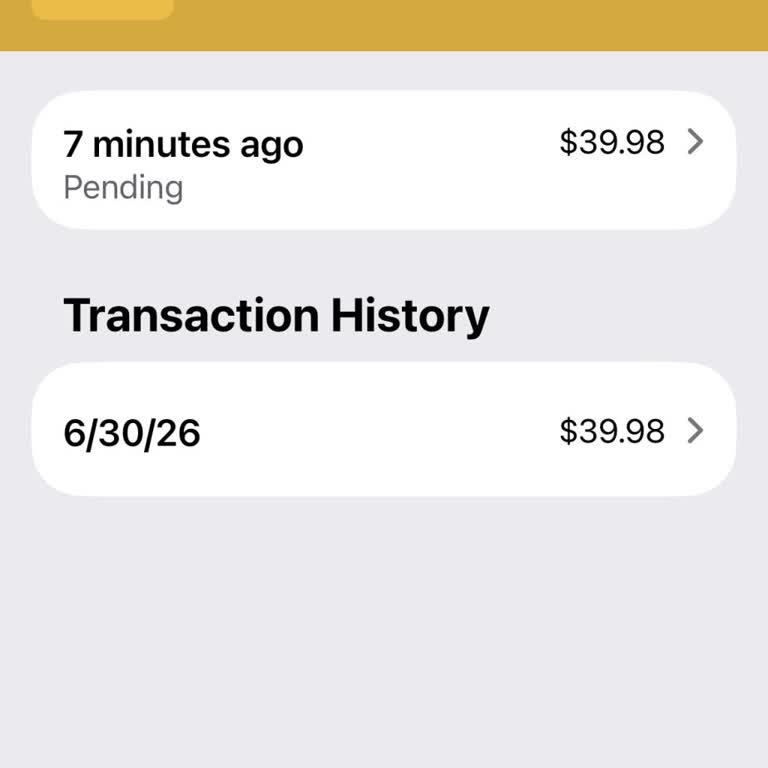
I have a serious problem with my Testora subscription. Although I have tried to cancel it today, the subscription is sti...ll active and I keep being charged against my will. The amounts taken are different each time, and these unwanted charges have been occurring since 6 June. After noticing this, I c
I cancelled my Testora IQ subscription about a week ago, yet I was charged again today 07/19 for 39.98 USD, as shown on ...my recent Bank of America transaction screen. Being charged after cancellation is unacceptable and has caused me both financial and emotional frustration. After noticing the new ch
For several months I have been charged for a subscription I never intended to sign up for, related to Testora / “V*iq Me...ntal-Impulse”. The first charge I noticed was on my credit card statement on 19/10/2025, and the payments have been deducted via my Apple account without my clear consent or any de
I am writing regarding an issue I am experiencing with my TESTORA IQ subscription, which I started on June 6, 2026 throu...gh Google Play. On the same date, June 6, 2026, I attempted to cancel my subscription, yet I was still charged $19.99 for one month despite my cancellation attempt. I have a record
MI made a $1.99 test purchase through Testora, for an app called Testora IQ App, on 12/15/2025. I believed this was only... a one-time trial charge. However, when I later checked my credit card statement, I noticed that starting from December 22nd up until today, a total of 7 charges of $24.99 each had