Xolvie Resolution Specialist4 Aralık 2024 13:17
There are a few things that could be causing your Philips DST8050/20 Azur steam iron to stop heating.
First, make sure that the temperature dial is set to the right level for the fabric. If it's too low, the iron might not heat up properly.
For safety, many Philips steam irons have a device called Auto Shut-Off (ASO). This mode kicks in when the iron is not used for more than 30 seconds horizontally or eight minutes vertically.
The hot light blinks, and the iron cools down. To turn it back on, either move the iron or press the power button. It will then heat up again.
If these steps don't fix the problem, you may need to descal the iron. Over time, mineral layers can build up and make things less effective.
If the problem still happens after these steps, there may be a problem inside the computer. For professional help in this situation, you should call Philips customer service or go to an authorised repair centre.
If none of the above solutions work, please feel free to share your experience. You can also file a complaint on our website.
Vote
Related Complaints
Philips Did Not Replace My Faulty PSG7040 Steam Generator Iron Despite Issues

January 29, 2025 5:43 PM
I purchased a Philips PSG7040 steam generator iron on October 18, 2024, and it has broken down twice since then. The fir...st issue was that steam, instead of coming from the iron, started leaking from the sides of the boiler. It was sent to service and returned. However, soon after, it began dripping
Philips DST8050/20 Azur Steam Iron Not Heating

May 6, 2024 4:34 PM
I bought the Philips DST8050/20 Azur Steam Iron on April 30, 2023, however it stopped heating and flashed an error warni...ng on the screen. On February 5, 2024, I brought it to the approved service center, S**** K****-Deniz Elektronik, for repairs. They said it was mended within a day and asked me to
Philips Lumea SC2007/00 IPL: Charging Malfunction & Unhelpful Service

November 3, 2023 2:53 PM
I purchased a Philips Lumea SC2007/00 IPL device, but it will not charge. The technical service said it couldn't be repa...ired and offered a discount on a new one. They will not reveal the price unless I agree to purchase a new one. I contacted customer service, but they refused to provide a repair es
Philips Azur Elite Optimal Temp Iron Cannot Be Fixed

October 22, 2023 9:40 PM
My Philips Azur Elite Optimal Temp iron broke down. The local Philips service in my city, Eskişehir, decided to replace ...the base of the iron, but after a 50-day waiting period, they informed me that the base of the iron couldn't be sourced in Turkey. They proposed to exchange my iron with another on
Continuous Defects and Frustrating Warranty Denials: Philips Steam Iron Nightmare

October 17, 2023 7:40 PM
I bought a Philips steam iron (model HI5918/20) from the BIM market. The iron had a problem with its card that was cover...ed by warranty, so it got fixed. But, before a year went by, it had the same problem. At this point, the warranty has already expired about 2-3 months ago. The problem is that this
Philips PerfectCare PSG9050/20 Iron Replacement Request

October 15, 2023 3:16 PM
On June 15, 2023, I paid 12,900.00 TL to Teknosa for the Philips PerfectCare PSG9050/20 steam iron. From the first use, ...it was clear that the product did not live up to its advertised features. It not only failed to perform its functions, but it also damaged the items I attempted to iron. My convers

Philips 8500 Series Iron Return Fiasco

September 7, 2023 12:08 AM
Hello, I purchased the Philips 8500 series state-of-the-art iron from Vatan Computer yesterday. However, as described, t...here is no such thing as steam wrinkle removal. I wanted to return it in the morning, but they told me, "You can't return the product; you've bought it, so deal with it." I couldn'
Philips Azur DST 7061/30 Steam Iron Failure

August 23, 2023 4:27 PM
My frustrating experience with the Trendyol-purchased Philips Azur DST 7061/30 Steam Iron left me perplexed. When I open...ed the box, the iron simply did not work. How could a brand-new, Philips-branded item not work? Is there any kind of quality control in place? The sense of disappointment was palpa
Philips Psg 8160 Steam Iron Leaking Problem

August 14, 2023 8:41 PM
I recently purchased a Philips psg 8160 model steam iron. Surprisingly, it began leaking water during the first use. Whe...n I contacted customer service, they suggested I take it to a service center for inspection. We dropped it off at the authorized service center in Erzurum today, promising to pick
+2
Philips Faulty Iron and Unreliable Customer Service

June 22, 2023 11:00 PM
We purchased a Philips iron towards the end of last year, but within just 2 weeks, it started leaking water. The same is...sue occurred three times, prompting us to request a replacement with a new iron. It took approximately 3 weeks for our request to be approved. However, even after 1.5 months, we st
Defective Philips Azur Iron with False Promises!

June 15, 2023 12:40 AM
I purchased a Philips Azur iron from Media Markt. I was in the middle of ironing when the steam shut off unexpectedly be...cause the steam trigger became stuck. Furthermore, the soleplate turned black even when ironing clothes using the recommended settings, despite the company's assurances that it was
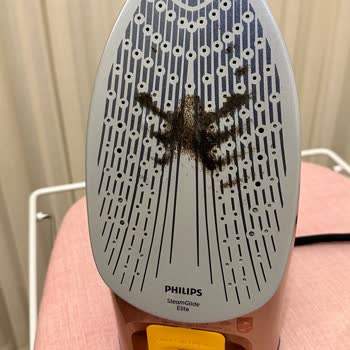
Philips PerfectCare 9000: Constant Leakage and Limescale Issues

June 6, 2023 12:57 AM
This thing has given me all the trouble one iron can. Many trips to the authorized service center for cleaning have resu...lted in the same issues reappearing within a few of months. Even though it's been less than a year since I bought the product, I'm still having the same problems, which suggests th
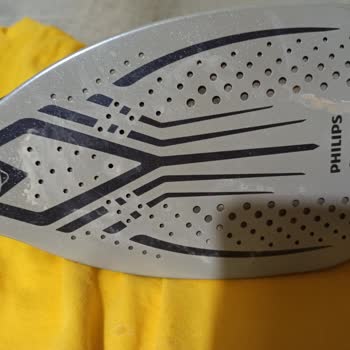
Philips Boiler Iron: Warranty Denials, Lack of Updates, and Threats of Scrapping

May 28, 2023 11:55 PM
Dear Sir/Madam, I will explain the grievance I experienced with my product below. My Philips boiler iron has malfunction...ed. I took it to İzmir Karşıyaka Sezel Technical Service. It was said that the main display card will be changed, I paid the price, it was said that it has 6 months warranty. In a
Philips Azur8050/20 Iron Malfuncted, Leaks Water, and Retailer Refuses To Refund
May 10, 2023 9:16 PM
I purchased the Philips Azur8050/20 iron with high hopes, but my experience quickly turned into a frustrating ordeal. Af...ter only two uses, the iron failed to heat up and started leaking water during the third attempt. I bought it from Teknosa, but their response was worse than all, they refused to a
Philips Azur Iron Causes Yellow Water Stains and Lime Deposits

February 18, 2023 5:47 PM
I bought a Philips Gc4905/40 Azur iron about two years ago, and it has served me well until recently. Unfortunately, I'v...e been having an annoying problem with the iron. It has left yellow water stains and lime deposits in the steam holes, making proper ironing difficult. Despite the fact that the wa

PHILIPS
View All Complaints