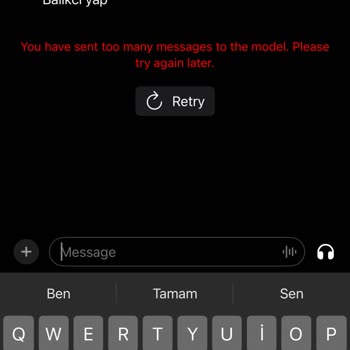
ChatGPT has stopped responding or is freezing during a conversation, what should I do?
11 Views
Sometimes technical issues may occur:
Server overload,
Internet connection problems,
Internal timeouts during request processing.
What to do:
Refresh the browser page.
Reconnect to the chat or log back into your account.
Shorten your request or break it into parts.
Wait a bit — the issue may resolve quickly.
If the problem persists:
Check the service status (e.g., via monitoring websites).
Contact the support team of the platform where ChatGPT is being used.
💬 If freezes happen frequently, you can file a complaint via Xolvie to help speed up the resolution of technical issues.
It gave me an error about the Chatgpt application as if I wrote things that I did not think I wrote. Because of this sit...uation, I argued with my girlfriend and she left me and although I said there was a mistake in the application, no one believes me. I am trying to contact from everywhere. Please s
Today, I purchased a ChatGPT Plus subscription and made a payment of ₺499.90. Although my membership is active, I’m not ...able to benefit from the Plus service as expected. When I ask ChatGPT to perform a task, it repeatedly responds with phrases like “Should I do it this way or that way?” and never a
I’m a ChatGPT Plus subscriber and usually use the service through the Chrome browser. Today, I experienced yet another i...ssue that caused me serious inconvenience: when an unresolved error occurs, the Stop button doesn’t work, the chat freezes, and the system completely stops responding. In this stat
I have been a long-time user of ChatGPT and have greatly enjoyed using the service. However, recently, while working on ...some detailed tasks, I encountered a frustrating issue. In the middle of productive conversations, when the topic required deeper exploration, I suddenly received a message saying,
After subscribing to ChatGPT Plus, I attempted to test the video generation feature with a simple, short request. It was... meant to be a trial run to explore the capabilities of the new function. However, the experience was incredibly frustrating. The system left me hanging for hours, repeatedly sendi
Hello, I downloaded the ChatGPT app about a month ago. At first, everything was fine—I created two or three images and w...as impressed. But then I received a “limit reached” warning, which I understood, assuming I’d need to wait a few days. However, 10 days later, I was suddenly logged out of my accou
I purchased a ChatGPT Plus subscription two days ago, expecting more stability and performance. Instead, I’ve been deali...ng with constant issues from the moment I upgraded. Initially, when I gave it a task, it responded by saying it would take time—but then kept apologizing endlessly: “I’m sorry, you
We sent payment to take advantage of ChatGPT’s paid subscription benefits, but never received the promised services. Ins...tead of delivering what was advertised, the app responded with empty apologies and vague motivational messages, as if that would make up for the failure. It’s hard not to feel like
As a ChatGPT Pro subscriber, I’m reporting a serious service malfunction that’s been going on for hours. Basic operation...s like processing subtitle files (SRT conversion, file saving, etc.) consistently fail with a repeated “acetoomanyrequestsexception” error. Even local file-saving tasks are restric
I turned to ChatGPT for help while working on a small test game, expecting reliable support in generating game sprites. ...What I got instead was endless frustration. On the first day, I waited 3–4 hours for a response—only to get message restrictions. I couldn’t even continue the conversation. This we
I have been using ChatGPT for a long time to work on creative projects and visual designs. However, my recent experience... was extremely disappointing. I waited nearly 6 hours for my visual generation request to be processed, only to repeatedly see messages like, "The system is busy; your request wil
I recently subscribed to ChatGPT, a platform I had been very satisfied with, but today it stopped working unexpectedly. ...I cannot understand why this issue occurred, especially without any prior notification. As a paying customer, I find this unacceptable. I am requesting a full refund for the subsc
I’ve been trying to get information from a 5-page PDF using ChatGPT, but I keep running into issues. I’m trying to go th...rough the pages one by one, but every time, it responds with an error message about the pages. It constantly apologizes but doesn’t give me the information I need. To make things w
I’ve been experiencing issues with ChatGPT’s servers. Whenever I send a request, I sometimes receive an empty response. ...I have to resend the request one or more times before I finally get an answer. This is very frustrating, especially since I’m paying for the service. I don’t understand why this is
I’m unable to access the ChatGPT app, despite trying everything. I’ve restarted my phone, deleted the app, and reinstall...ed it three times, but nothing works. Oddly, I can access ChatGPT through Google on the same phone, but the app itself just won’t open. I’ve tried every possible solution, but noth
I subscribed to ChatGPT OpenAI, but the system won’t open or work properly. It’s been a complete disappointment. Despite... the subscription, I keep getting a message saying my usage limit is reached, and there’s no way to contact support. I feel stuck, and I have no idea how to cancel or resolve this
I purchased a ChatGPT Plus membership, but the app started encountering errors while using DALL-E to create images. It s...eems like our money went to waste! There's no one to address my concerns urgently! Why isn't there a customer service or live chat service to quickly resolve such issues? As a teac