Nebula charged me unexpectedly after the free trial — how can I request a refund?
315 Views
If Nebula applies unexpected charges after the free trial, the most important thing is to act quickly to cancel the subscription and request a refund. Here are some practical steps:
• Save the evidence: Keep proof of the charge (bank or PayPal statement) and, if possible, screenshots of the offer that mentioned the free trial.
• Cancel the subscription: Go to the Nebula app → Profile → Subscriptions and turn off auto-renewal. If you paid through the Apple App Store or Google Play, cancel from Settings → Subscriptions on your device.
• Submit a formal claim: Write to [email protected] with the subject Charge after free trial – Refund request. Attach proof of the charge and specify the date your trial ended.
• Open an official ticket: If the charge came from purchases in their store, also contact [email protected] or use the support form at https://support.nebula.tv to register your claim in writing.
If you don’t receive a resolution, file your complaint on Xolvie to bring attention to the issue.
I am writing regarding an issue with my Nebula: Horoscope & Astrology subscription. I was charged $14.99 on 7/12, but I ...never received any active subscription or access in return for this payment. I request that this unauthorized or unfulfilled subscription be fully cancelled and that no further cha
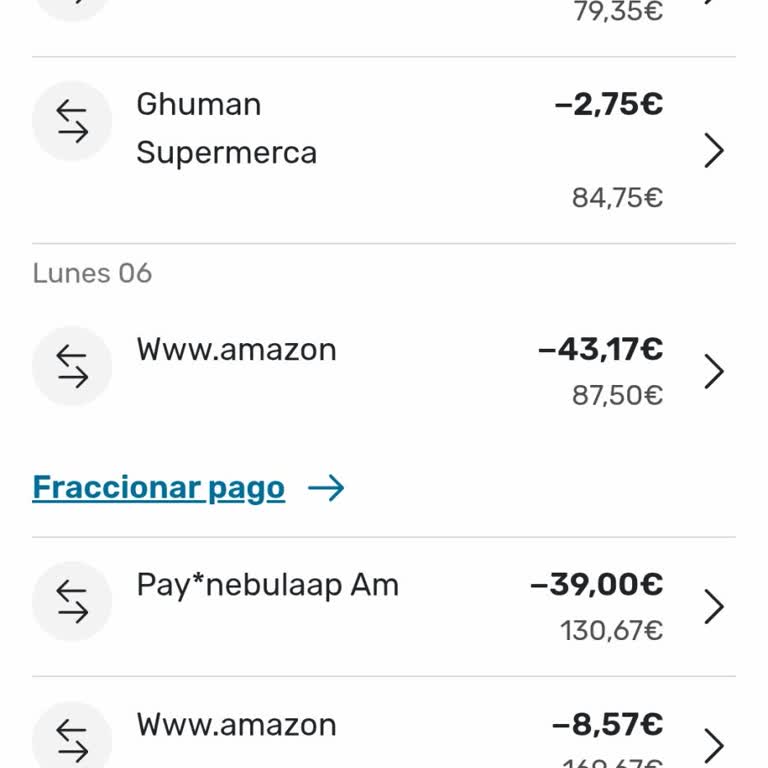
Le escribo para informar de dos cargos de 39 € cada uno realizados por Nebula app en mi cuenta bancaria de Barcelona, un...o en junio y otro en julio, por un total de 78 €. Nunca me he suscrito a ningún servicio de Nebula app ni he autorizado estos pagos de ninguna manera. Estos cargos aparecieron dire
I noticed that Nebulaapp charged $44 to my debit card on June 24, 2026, without my knowledge or approval. Although I had... knowingly started the subscription before, I did not receive any clear or understandable notice that a renewal or charge in this amount would be made. I do not accept such a high
An unauthorized charge of €51.45 was made to my Erste Bank card by Sgt*appnebulaco without my knowledge or consent. I ha...d only used the app once to receive a palm reading, for which I paid €1. Other than that one-time payment, I never agreed to any subscription, recurring billing, or additional char
I only selected the two-day free trial in the Nebula app. Even though no active subscription appeared in my account, I r...eceived an SMS from İş Bankası today at 2:24 p.m. stating that $15 had been charged to my account and that another charge of $45 had been attempted at the same time. The bank block
When I first used the STG*TheNebulaAP app, I only made a one-time payment of $1. After making that payment, I no longer ...felt comfortable using the service, so I immediately left the website/app. I did not sign up for any membership, subscription, or additional paid service, nor did I provide authori
At around 9:00 a.m. on June 19, 2026, I discovered that an unauthorized charge of $22 had been made to my Paycell card a...ccount by the Nebula Astrology app. I had previously used only the app's free subscription, then canceled it through my Apple account and deleted the app from my iPhone. What make
I downloaded the Nebula Astrology app once to try it, then deleted it from my phone. I never started a paid membership, ...agreed to a free trial, or made any in-app purchases. Despite this, on June 17, 2026, my Yapı Kredi credit card was charged $44 without my knowledge or authorization. As soon as I
About a week ago, I made a $1 purchase through the Nebula Astrology Instagram page, and the payment was processed withou...t any issues. After that transaction, I did not actively use the service again, nor did I make any additional purchases or authorize any subscription or recurring payment. Today,
I was directed to the Nebula astrology app through a link I saw on Instagram. I use an Android phone, and the app was li...kely downloaded from the Google Play Store through that link. On May 30, 2026, I purchased only a one-time astrology service to receive a birth chart reading and was charged $1 to
On June 1, I purchased a $1 package through the Nebula app and used that package. However, I later discovered that the s...ubscription had been automatically renewed without my approval and that $44 was charged to my account on June 8. I cannot see any screen in the app showing that my subscription is
I am writing regarding an unexpected charge of £49.99 that Nebula took from my account after a free trial ended on 4th J...une. I started using Nebula on a free trial and did not expect to be charged £49.99 afterwards. Once I noticed the payment, I contacted your customer support, but so far I have not
I downloaded the Nebula app from the App Store. However, on May 26, 2026, at 7:55 p.m., my physical İş Bankası credit/de...bit card ending in 86 was charged $42.99 without my knowledge or authorization. According to my transaction history, the payment appears as a one-time purchase rather than a subscr
Even though I never purchased a subscription to the Nebula Astrology & Horoscope app, an unauthorized automatic payment ...of $44 was withdrawn from my Akbank account on May 26, 2026, at 9:11:47 p.m. The transaction receipt number is 000474453. I never signed up for a membership, approved a subscripti
I am filing this complaint because money was withdrawn from my account by the Nebula astrology app without my knowledge ...or authorization. I first came across the service through an advertisement on its website. I do not have any subscription through Google Play, and I never knowingly or intentionall
I am filing this complaint because money was withdrawn from my account by the Nebula astrology app without my knowledge ...or authorization. I discovered the app through an advertisement on a website. I do not have any subscription through Google Play, and I never knowingly or intentionally started any
On May 19, 2026, I paid approximately $21 by bank transfer (EFT) for a YDS STS Nebula subscription. I never used this su...bscription or received any benefit from the service. Despite that, I discovered that my subscription is still listed as active. I am requesting that my Nebula YDS STS subscription
I am writing regarding an unauthorized payment of £49.99 that was taken today from my Monzo account by As Nebulap. I did... not approve or knowingly initiate this transaction and I have no information about any product, subscription, or specific service that this payment might be related to. Upon notic
I downloaded the Nebula spiritual guidance application from the Google Play Store and only tried the trial version. With...in approximately one hour I decided that it was not suitable for me, did not wish to become a subscriber, and removed the application from my phone. I did not approve any paid subs
I downloaded the application called “Nebula Spiritual Guidance Area” to my Android phone through Google Play. I used the... 24-hour trial version of the application, and within approximately one hour I realized that it was not useful for me and did not meet my expectations, so I deleted the app. Even t
I would like to file a complaint regarding a company called Nebula Astrology. Today, I noticed that approximately $51 wa...s charged from my bank card without my knowledge or consent. I do not know what service or subscription this payment was supposedly for, and I do not even remember starting any sub
On 05/03/2026 at 02:12:21 AM, a charge of approximately $52 was made from my credit card under the description “PAY*Nebu...laAP” without my knowledge or approval. I did not purchase any package related to Nebula: Horoscope & Astrology, I never downloaded the application, and I only visited the Astrodie
On 04/27/2026, approximately $6 was withdrawn from my İş Bankası debit card by Nebula without my knowledge or permission.... I do not even know whether I subscribed to Nebula or not. Before downloading the application, the screen was in Turkish, but after downloading it, everything continued in English
I started a £1 trial for Nebula Horoscope via the Apple App Store about four weeks ago. At the time of starting the tria...l, I immediately cancelled the subscription through my Apple ID settings, well within the trial period, so that I would not be charged further. Despite this, I have now seen a pend
I purchased a $1.00 reading through the Nebula App Subscription with the clear information that I would have 7 days to c...ancel. Despite this, I was charged multiple times and amounts that I did not consent to. Instead of the $1.00 trial, $5.00 was taken from my account on 02/04/2026. Afterwards, I wa





















3 Comment