I made a mistake during the booking process on Expedia and need to cancel and rebook correctly. How do I cancel?
516 Views
Based on the kind of reservation you made, the process differs. Remember that while some hotel rooms may be completely or partially refundable, others might have limitations on changes or cancellations. The same room type or price as your initial reservation cannot be guaranteed by Expedia. You might need to adhere to particular rules if your hotel reservation is a component of a vacation package in order to make changes to your package:
· Making a hotel reservation change:
Start by accessing your bookings in the "Upcoming" section of Expedia to make changes to your hotel reservation. Pick the specific route you want to alter. You can choose to "Change this reservation" under the "Hotel Overview" section. To make the necessary adjustments, adhere to the on-screen instructions.
· Changing a rental property or other asset:
Contact your property manager for information about vacation rentals or other kinds of properties. In these situations, they are in charge of managing changes. Your itinerary contains the contact information for the property manager, giving you a direct line of communication.
· Refunds, Change Fees, and Policies:
Changes are typically free on Expedia, but individual hotels may have their own rules and fees.
To learn about potential fees, you can review the hotel's specific change and refund policies in your itinerary.
On September 4, 2026, at 18:38, I made a booking from Kocaeli, Turkey, via Hotels.com (through Expedia Travel) for Mardi...n Beyt Merin Konağı, covering the dates of January 25, 2027 to January 28, 2027. A total payment of $210 was charged directly to my account without sending me any confirmation code
I recently made a hotel reservation in Waikiki through Expedia, using customer service number 844-9544-929. Since comple...ting this booking yesterday at the Palm Hotel, I have urgently needed to cancel the reservation and receive a full refund, but I have been unable to reach your customer service. Th
On August 6, 2026, I made a hotel reservation for 1774 Kazdagı Termal Butik Otel Akcay Edremit via the Expedia app, tota...ling $488 under booking code 2527894612. Subsequently, on August 9, 2026, the hotel canceled the reservation under the claim that the rate fell below their list price. However, acc
I recently made a hotel reservation in Waikiki through Expedia, with the customer service number 833‑5978‑642*✦**. Since... completing this booking yesterday at the Palm hotel, I have urgently needed to cancel the reservation and receive a full refund, but I have been unable to reach your customer serv
I booked a ticket through Expedia via a Skyscanner recommendation, but now I need to cancel and request a refund. Unfort...unately, I cannot reach Expedia customer service. The phone number provided either doesn’t connect or gives a broken signal. I’ve also tried seeking help through their support sect

I purchased a Delta flight ticket from Expedia for the Chicago–New York route. The ticket was issued under the name Alex..., but the correct passenger name should have been Mia. Shortly before the flight, with about 2 hours left before departure, I requested that the name on the ticket be changed from
On February 9, 2026, I made two separate reservations through the Hotels.com app with reservation numbers 72070950189190... and 72070950336756. For reservation number 72070950336756, I selected the “pay at property” option. For reservation number 72070950189190, I paid $241 with my credit card ending i
I would like to share my serious dissatisfaction regarding my experience with Casa Foscolo Hotel in Istanbul. On Februa...ry 5, my employer in China made a one-night reservation at your hotel on my behalf. Due to the time difference between China and Türkiye, the reservation was mistakenly made for Fe
When my M*** reservation was canceled without my request**, I contacted Titanic Hotel, but they told me there was nothin...g they could do. After that, I contacted Hotels.com, and they helped me make a new reservation at Titanic Belek for $1,004 (the current price was about $1,455, and they refunded ab
I made a reservation through Agoda.com for the Konya Meva Hotel for the dates November 12–16. When I arrived at the hote...l, I learned that the property was under renovation. Neither Agoda.com nor Expedia informed me about this situation in advance, and no representative contacted me. As a result, I w
I purchased my Amsterdam–Rome flight ticket dated November 10, 2025 through Expedia’s website under reservation number 7...3288164209630. At the time of purchase, I chose a higher-tier package that clearly stated a €70 per person change fee. After realizing that I had mistakenly selected an evening fli
I booked a reservation through Expedia at La Boheme Kabak Hotel in Muğla, with a check-in date of September 17th and a c...heck-out date of September 20th (Reservation No: 2275130484). However, since the hotel does not accept infants, I was forced to cancel my reservation. The hotel staff confirmed th
I booked a hotel through Otelz, but since it was an international property, the booking was actually handled by Expedia.... When I tried to cancel my reservation, I was told the hotel needed to contact Expedia directly to approve it. For over a week, I have been going back and forth between Expedia an
Despite selecting the dates for October 13-15, the system automatically changed my reservation to January 13-15, which I... didn’t notice and accidentally confirmed. After realizing the mistake, I canceled the booking, but now both Expedia and the hotel are shifting the blame and refusing to issue a re
On August 10, 2024, I made a reservation for Samsun Gloria Tibi Hotel for a stay on August 12, with the reservation numb...er 1329015276. I realized the date was incorrect and tried to change it, but the system wouldn't allow me, so I canceled the reservation on August 10. The hotel informed me that th
I made a reservation through Hotels.com for travel dates July 20, 2024, to July 25, 2024, under travel plan number 72056...939037189. Initially, I intended to book for two people, but the reservation was automatically reduced to one guest after payment. I only realized this mistake after making the pay
I made a reservation through Hotels.com for travel dates July 20, 2024, to July 25, 2024, under travel plan number 72056...939037189. Initially, I intended to book for two people, but the reservation was automatically reduced to one guest after payment. I only realized this mistake after making the pay
We are not receiving any payments for our reservations made through hotels.com, which is owned by Expediagroup. Although... we were told that the payment was made to our account, we have learned from our bank that no payment was made and that sufficient information was not available, but we are unable
I made a car rental reservation through Expedia.com, selecting the largest insurance package offered by Hertz. However, ...when we arrived to pick up the car, Hertz stated that they did not recognize that package and required us to purchase insurance again. Additionally, Expedia had charged me $100 upf
I usually rely on Expedia when it comes to booking hotels. I updated my travel dates to the 26th-28th instead of the 17t...h-19th. Even though I didn't make any changes, my account has been deducted 1560 TL instead of the expected 1443 TL. I have pictures that clearly show this distinction. I feel deep
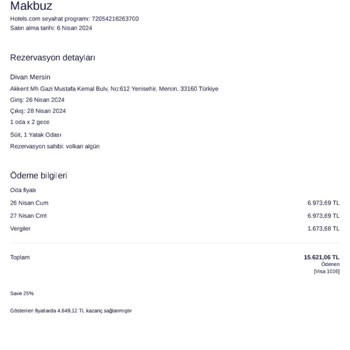
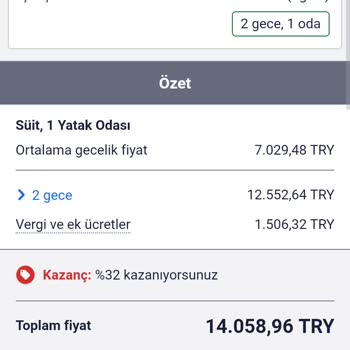
Expedia is refusing to refund our hotel reservation! On April 9th, 2024, my spouse booked a two-night stay at the Ramada... Hotel in Eskisehir. Unfortunately, due to an important situation, we realized we wouldn't be able to make it and requested a refund. Here's the problem: Expedia has no phone numbe
I booked a hotel through Expedia and requested payment 30 days after my stay, as their policy requires. However, I still... haven't received my money! Here's the problem: Expedia claims they paid me, but my bank shows no record of the transaction. They even sent me a payment confirmation, but my bank s
Big mistake! I accidentally booked the wrong date for my stay at the Intel Hotel Amsterdam Landmark through Expedia. Tha...nkfully, the hotel itself is willing to cancel the reservation free of charge. Here's the problem: Expedia is refusing to issue a refund despite the hotel's cancellation policy! T