Xena Live banned my account without warning how can I recover my account?
45 Views
If Xena Live banned your account without warning and you want to recover it;
Check the ban notice first;
• Try logging in → Read the exact message shown
• Look for:
– “Account banned”
– “Suspended”
– Any reason given
• Screenshot the ban message
Prepare your appeal information;
• Registered email / username
• Date/time you were banned
• Screenshot of the ban message
• Short explanation saying you did not violate terms (if true)
Contact Xena Live Support;
• Use the in-app Help/Support, email, or website contact form
• Explain your account was banned without warning
• Provide your appeal information above
• Ask them to:
– Explain the reason for the ban
– Re-review your account
– Restore access if possible
Follow any required verification;
• Some bans happen due to:
– Unverified email
– Security checks
• Complete any requested verification steps
If unresolved or the ban seems unjustified, consider filing a complaint on Xolvie to pursue a resolution.
I am a customer of Xena Live and my account number is 18492***. A few days ago, when I tried to join and log in to Xena ...Live, I received a message on the screen saying that my account involves exposure and has been banned by “device login”. I do not understand why my device login has been banned, an
I am writing regarding the permanent suspension of my Xena account. I have been using my account for approximately one ...month. When I woke up this morning and tried to log in, I found that I could no longer access my account. Instead, the application displayed a message stating that my account had b
I am writing to complain about the permanent ban imposed on my Xena Live account without a valid reason. Two weeks ago, ...while using Xena Live on my iPhone 17 Pro Max, I suddenly found that my device and account were permanently banned from accessing the system. The account ID that was blocked is 356
I am writing to complain about the ban placed on my Xena party account. My account, which is linked to the phone numbers... 9712500*** and 7017570***, was banned on 07/07/2026. Since then, I have been unable to open or access my account despite trying very hard multiple times. I do not understand the e
I am writing regarding the permanent suspension of my Xena account, registered under the username "Sinanzorbey." I was ...broadcasting on the platform as a member of an agency. When I wanted to transfer to another agency, I was told that I first had to make a 5M gift/send-out. I explained that I could
I am writing regarding the suspension of my Xena Lite account. I have been using Xena Lite for a long time to chat and ...play games, and I have spent a significant amount of money on the platform. Yesterday, my account was suddenly banned without any explanation or indication of which rule I had alle
I am writing regarding my Xena Live account, which had reached VIP Level 10 before it was stolen approximately three mon...ths ago. After my account was taken over, someone used it without my knowledge or permission to promote other applications during live broadcasts. I later learned from people I kn
Hello Xena Support Team, My account on the Xena platform, registered under the ID and username “PK510088 ᗯEᗩᑭOᑎ🍷”, has ...been banned, and I believe this may have happened by mistake. I kindly request that my account be reviewed in detail and that the ban be removed if possible. I always try to follow
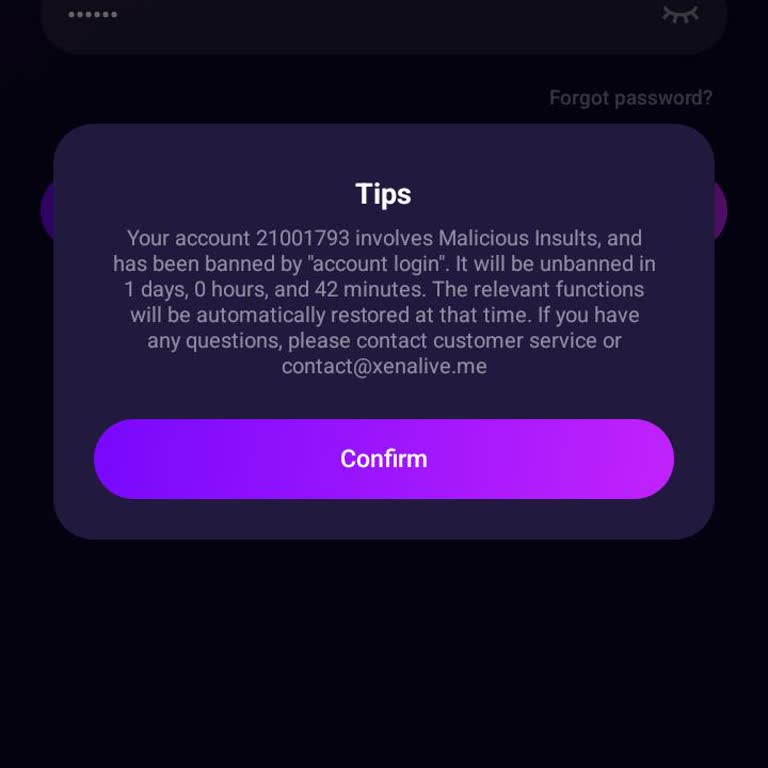
I am an active Xena Live user on Android, and my account with ID 25719826 was banned on April 6, 2024, while I was simpl...y playing the game as usual. I have spent money in the app and purchased coins specifically to play, and I have only used my account for normal gameplay. I did not receive any wa
I am writing regarding the sudden ban of my Xena Live account on 2 April, which I believe was done without any valid rea...son. I had arranged a recharge through a coin seller and paid a total of ₹115 via Paytm, but the seller did not add the coins to my account and, shortly after this, my account was
My Xena Live account was permanently banned about two days ago without any explanation. Before the ban, I was using my a...ccount normally and did not engage in any rule violations, cheating, or inappropriate behavior. After the ban, I lost access to my account and the ability to use the balance that
I was using my account for free on the Xena app under the username “Demet.” However, when I tried to log in today, I rec...eived a warning saying that my account had been banned for “containing advertisements.” I never shared or posted any advertisements. The only thing that happened was a friend told
I have not been able to access my Xena Live account for the past two weeks. When I try to log in from my Android phone, ...I receive a warning that says “Banned due to advertising.” My account number is 9274552. I have no idea what kind of advertising-related content I supposedly shared, and I never r
I’ve been using the Xena app for a while now, and not only have I lost a significant amount of money, but I’ve also now ...been banned from my account without warning. This is unacceptable. I invested so much on this platform, only to be treated like this—with no explanation, no notice, and absolutely
I’ve been using Xena Live for a long time and never had any issues—until now. Out of nowhere, I was hit with a device ba...n. I have no idea what I did wrong. I didn’t receive a warning, a notification, or any explanation. My user ID is 5531811. I’ve followed the rules, harmed no one, and now I’m compl
I am a voice chat agency owner and broadcaster on the Xena Live app. Without any prior warning or clear reason, my accou...nt (ID: 1164299), into which I have invested a significant amount of money, was suddenly banned. Given the amount of money I have spent on this account, I find this situation comp
I am unable to log into my Xena Live account, and instead, I see the message "harrasment" displayed. I have no idea what... this means, and I demand a solution. When I translated the term into English, it gave a disturbing meaning, but I have never engaged in any inappropriate or offensive conversation
I am unable to log into my Xena Live account, and instead, I see a message saying "harrasment." When I translated this, ...it showed a meaning related to harassment, which is completely unfair and misleading. I have never engaged in any inappropriate or offensive conversations, so I have no idea why my
I can’t access my Xena Live account, and I have no idea why. I haven’t violated any rules, I don’t cause trouble, and I ...stay out of conflicts. Yet, I’m locked out of the platform for no reason. Yesterday, another user insulted and cursed at me, but I didn’t even respond. Now, I find myself unable t





















1 Comment