I bought an app and Google Play isn’t activating it — how can I fix this without paying again?
4 Views
If you bought an app on Google Play and it isn’t activating, and you want to fix it without paying again:
• Make sure you’re using the same Google account you used for the purchase
• Go to Payments & Subscriptions → Order History and confirm it shows as “Purchased”
• Sign out and back into the Play Store
• Clear cache and data for the Google Play Store, then restart your device
• Check that the app isn’t installed under a different account or user profile
If it still doesn’t activate:
• Uninstall and reinstall the app from Play using the correct account
• Ensure you have a stable connection and no pending payment issues
Contact Google Play support stating that the purchase was processed but not activated:
• Include the transaction ID (GPA.XXXX), date, and amount
• Attach a screenshot showing it appears as paid
Ask them to:
• Confirm the license is properly linked to your account
• Manually resync the purchase
• Clarify whether the developer needs to intervene
• Provide a case number and response timeframe
If the issue persists, share your experience and consider filing a complaint on Xolvie to seek a resolution.
I would like to file a complaint regarding a purchase I made in Neptune’s *Idle Cat Gunner: Shooter RPG*. On September 2...1, 2026, at around 8:24 PM, I purchased an in-game package to remove advertisements. I was charged approximately $11 through Ziraat Bank, and I have the payment receipt as proof. I
On June 25, I purchased a subscription in the Nicegram app through Google Play for approximately $1.40. The payment was ...successfully processed through my Google Play account, and both the invoice and transaction record are visible. However, the subscription benefits, including the promised diamonds
On March 28, 2026, I purchased the game Minecraft via the Google Play Store with the order number GPA.3329-5274-0522-125...76, paying ₺300. Although the payment was successfully completed, the game cannot be installed on my device under any circumstances.The device I am using is a Samsung Galaxy A54 5G
On 11/03/2026 I purchased UC in PUBG Mobile through the Google Play Store, paying approximately 24.90 BRL. Despite the p...ayment being completed successfully, the UC was not added to my account. The purchase was made directly via the Play Store, and the problem occurred only with this specific transac
I made a purchase in the eFootball game by Konami through the Google Play Store, but I never received the pack I paid fo...r. On 3 March 2026 at around 6:35 PM, I bought a José Mourinho-related pack in eFootball using M-Pesa via Google Play. A total of Ksh 370 was deducted from my M-Pesa account with t
I purchased a gift card/event code for the game Free Fire through Google Play for approximately $7. However, when I try ...to redeem the code in the game, the system displays a message saying, “We need more information to redeem your gift card,” and the code does not work at all. Even though I have tr
I purchased gold in the game Travian through Google Play using my Türk Telekom mobile line; however, in both transaction...s, the gold was not credited to my game account. Last night and again about an hour ago today, I made purchases of $14 and $7, totaling $21, which were charged to my mobile account
I am a PUBG Mobile player, and I am currently unable to play ranked matches due to a UC-related error. When I try to ent...er ranked games, the game displays the message: “You do not have sufficient UC to use this feature. To improve your game experience, please complete the refunded UC,” and does not
On October 12, 2025, I made a payment of ₺1,299.99 through Google Play Store for the app “Ultimate Betting Tips | Luxury...” (Order No: GPA.3303-6141-8930-70390). I tried to use the app on my Samsung Galaxy A30, but even though I successfully registered, I couldn’t log in, and the features I paid for w
On my Redmi Note 11S device, when I tried to use the ₺100 gift code I purchased through Google Play, I encountered an er...ror saying “We need more information, please fill out the form.” This was the first time I tried to use the code, and I experienced no internet or device issues. I bought the code
I purchased a 100 TL Google Play balance from Turkcell Pasaj, but the code doesn’t work. When I try to redeem it on my G...oogle Play account, it keeps showing the message "We need more information." Despite sending the invoice, text messages, and all required details via email, the issue remains unres
I recently purchased 2500 in-app stars from Telegram through Google Play, but despite the payment being completed, the s...tars did not display in my account. I've contacted both Google and Telegram to remedy the issue, but I'm caught between the two. I just want this issue handled and to receive what
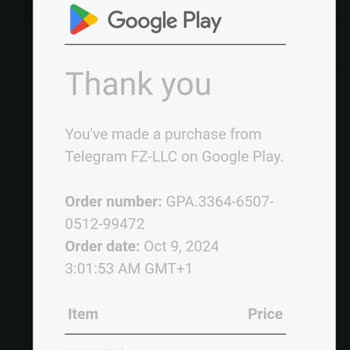
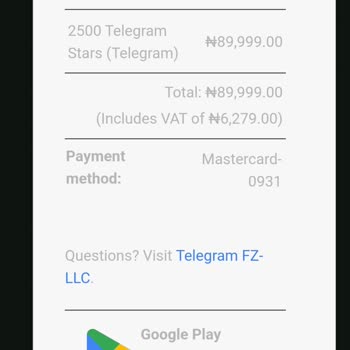
I recently purchased 2500 in-app stars from Telegram through Google Play, but despite the payment being completed, the s...tars did not display in my account. I've contacted both Google and Telegram to remedy the issue, but I'm caught between the two. Google claims the scenario does not fit under their
I bought a ₺250 Google Play code, but when I tried to redeem it, I got a message saying, "We need more information," and... was told to send an email to Google. I've already sent the email and am eagerly awaiting a response. I kindly request for this matter to be resolved promptly.
I attempted to make a purchase of ₺114.99 for the Android game Assoluto Racing, but unfortunately, my order was not succ...essfully processed. I'm not sure how to contact the support team or developer for help. Is there anyone available to provide assistance? Please either refund my money or fulfill my