I recharged diamonds on Chamet but they never appeared in my account, how can I get a refund?
73 Views
First, make sure the charge is real and take screenshots: Look at your receipts and buy history in the store you used, then restart and log back into Chamet to make sure there were no sync issues. Keep track of your order ID, time, and device.
If you paid through Apple, go to reportaproblem.apple.com, click on "Request a refund," pick the Chamet item, and email it. An email is sent to Apple after most in-app cases are looked at.
If you paid through Google Play, use Google's self-service return flow (within 48 hours is best) and show proof that the diamonds never showed up. You can also look at Google Play's refund rules to see if you are eligible.
You can get a replacement top-up or coupon from the seller you bought it from if you bought it from a third-party seller.
Many digital codes are non-refundable after delivery. Keep proof that no diamonds were given credit.
❗ If the issue persists, share your experience and consider filing a complaint on Xolvie to seek a resolution.
I use the Chamet application on my Realme Narzo N65 phone and joined the “invite friends” one‑time rewards program. Acco...rding to the campaign, I should receive 25,000 diamonds for inviting my friends. I already invited 5 friends and received 25,000 diamonds. After that I invited a total of 11 friend
I am writing about an issue I experienced today with Chamet regarding a diamond top up that I paid for but never receive...d. I made a payment of 1000 Rs for diamonds on my Chamet account, where my user ID is 151297***. The amount of 1000 Rs was successfully deducted from my account, and I have a payme
I am a user of the Chamet application and I would like to report a problem I experienced with a verified account on the ...platform regarding the purchase of diamonds. On 21 June 2026, I paid 10 USD through a Chamet verified account person to receive diamonds for my account with ID 17017***. Despite th
I am a Chamet user and I am writing because my diamond consumption return for 20 June 2026 is missing. On that date I sh...ould have received a return, but it was not credited to my account and it is not showing in my return consumption records. I contacted Chamet support about this issue, but they are
I am writing to report a cheating incident related to a Chamet top up. Last night at around 9 PM, I sent 500 TK via bKas...h to the number 20313*** in order to top up my Chamet account with ID 32226***. After I sent the money, I did not receive any coins in my account, and the owner of this bKash numbe
On June 1, I purchased diamonds in the Chamet app through Google Play using my recharge card. The payment was successful...ly deducted from my recharge card, and the transaction appears as completed, but the diamonds have not been credited to my Chamet account. After noticing that the diamonds were mis
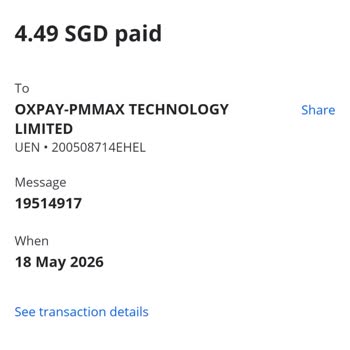
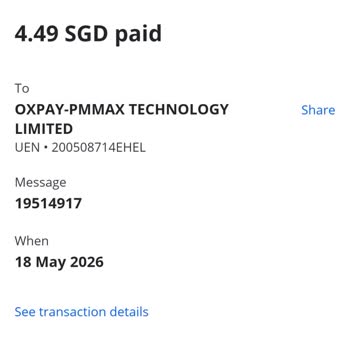
I made two diamond recharge payments on Chamet today through the Chamet website using an e‑wallet. The total amount char...ged was SGT 4.49 twice, and one of the transaction references is UEN‑200508714EHEL. Although the payments were successfully deducted from my account, the corresponding diamonds wer
I made four separate diamond purchases on the Chamet app, each for $13, but none of the diamonds were credited to my acc...ount. I completed the first and second transactions on April 4, 2026, between 01:00–03:00, the third on April 5, 2026, around 17:46, and the fourth on April 5, 2026, around 18:03.
I am writing to report a harassment incident I experienced on Chamet involving a user with the username “Cute cutie roy,...” whose profile indicates she is from India. During a chat at around 9:00 PM, this user harassed me using abusive language and profanity in a way that I found very disturbing. The
I made a purchase of 100000 diamonds on Chamet on 22/02/2026 using Google Pay, but the diamonds have not been credited t...o my account. The payment was made around 11:56 AM, and the UPI/transaction reference I have is 119000092046. Despite the payment being successfully completed through Google Pay, m
I made a payment of $150 to Chamet through an online purchase on January 29, 2026, using my bank card. I do not clearly ...know what was purchased or how it is supposed to be used, and I am unable to benefit from the service or product in any way. Because of this, I do not want this transaction to cont
I used Eneba yesterday for a Chamet top-up, and the diamonds have still not been delivered to my account. Yesterday at 1...9:45 UTC, I purchased and sent 187,500 diamonds to the Chamet account ID 24595366 through Eneba, but the diamonds have not appeared in the Chamet account until now. I contacted Ene
Today I purchased diamonds through the Chamet app using my Easypaisa account from Pakistan. An amount of 2,850 was deduc...ted from my Easypaisa balance, but the diamonds were not credited to my Chamet account. The Easypaisa transaction reference number for this payment is 44866275531. I have not yet b
I am writing regarding an unresolved issue with Chamet tokens that I purchased through the in-app top-up helper, but whi...ch were never credited to my account. On 9 December at around 1:18 a.m., I recharged 5,000 tokens and paid 85 rupees. I have clear screenshots of the transaction and payment as pro
I am a Chamet user on an Android phone, and my account has been used by someone else without my permission. My Chamet ID... is 59310***, my username is “selfemploye.. 79859 17***,” and my registered email is rajatkumarb***@gmail.com. I realised that someone unknown was accessing my account when I notic
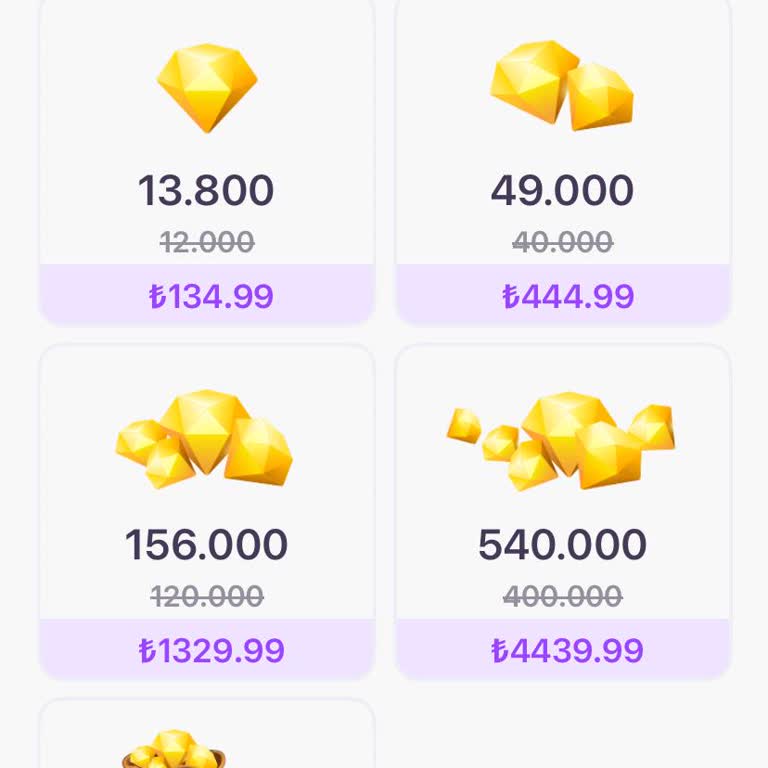
On August 24, 2025, I purchased diamonds worth ₺444 in the Chamet app through Google Play. Although the payment was succ...essfully processed, the diamonds were never credited to my account. My account details: 0541*68. This is the first time I’ve experienced such an issue with Chamet, and I have not
About a month and a half ago, while using the Chamet video chat app, I accidentally sent a large number of virtual gifts... to someone I did not intend to. The transaction was made from my account using my username and ID, and I was located in Mersin at the time. I no longer have an active membership w
Yesterday, I mistakenly deposited a significant amount of money into my Chamet account, and I am urgently requesting a r...efund of the full amount. This payment was not intentional, and I realized the error shortly after the transaction was processed. I immediately tried to find a way to reverse the c
I am writing with great urgency regarding a serious issue I faced with the Chamet app. I mistakenly spent close to ₺50,0...00 on this platform, and I am now in an extremely difficult situation. I immediately contacted support and requested a refund, but so far, I have not received any meaningful respon
Thirteen days ago, I made a payment transfer on the Chamet app, but the diamonds I purchased never arrived in my account.... This is extremely frustrating because I paid expecting an immediate balance update, yet almost two weeks later I am still waiting. I contacted customer service multiple times wit
Good evening. On the Chamet app, at 01:35 today, I mistakenly transferred ₺389.99 to my account. This payment was not in...tentional, and I realized the error immediately after the transaction was completed. Since then, I have been trying to find a way to contact support and request a refund, but there
I experienced a serious issue with the Chamet app regarding a payment I made. I want a full refund because the game has ...changed so much that it no longer works as expected. Every time I log in and try to play, I cannot earn anything and instead I keep losing my diamonds. This has been happening repe