I can’t reach PayPal customer service, how can I contact a real person for help?
219 Views
1 Comment18 Complaint
To reach a real person at PayPal, log into your PayPal account on the app or website, go to Help/Contact Us, pick the issue that best matches your problem, then scroll down past the FAQ.
You’ll see options to message support or request a callback from a live agent after the automated assistant can’t solve your case.
Real agents typically answer messages and calls during set support hours once you’ve entered the right topic.
Within your Message Center (in the app or site), start a new conversation and if the AI bot doesn’t help, ask to be transferred to an agent.
This is often the only route to a real person. Some regions also show a “Call Us” or callback request link once you choose a specific problem topic; using those increases your chance of speaking with a human.
These are key solutions that we can offer. If you have more, please share.
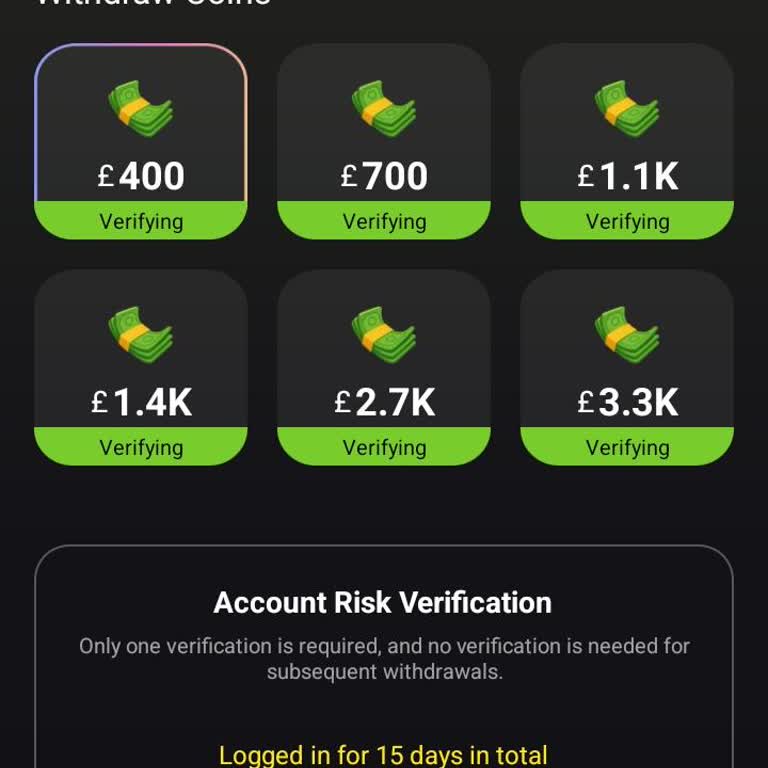
I have been using the Hotminidrama application for about four months and have accumulated earnings by regularly watching... videos. Despite this, I have not been able to cash out the money I earned on the platform. At the moment, there is more than £400 in my Hotminidrama account balance, as can be see
I live in the United States and have been using the Hot Mini Drama platform, where I accumulated over 4,000 USD in earni...ngs. On July 19th I requested a withdrawal to my PayPal account. Since then, all of my withdrawals have remained in “Verifying” or pending status for over two weeks, and I have not
I purchased a Champspy subscription on 22 July using my PayPal‑linked credit card and was charged 49.80. After this paym...ent, I decided to cancel and request my money back, but I have not received any refund. I have tried to reach Champspy about this issue, but I have not received any reply from them
I am writing to report a very serious issue with a PayPal payment and the complete lack of access to real customer suppo...rt. On 16 May 2026 I accidentally sent €300 via PayPal to a person called Chris E***, who was in Gran Canaria in the Canary Islands at the time. The payment went out as a transfer
I am writing about a problem I am experiencing with a 300 dollar withdrawal involving PayPal. I attempted to withdraw 30...0 dollars to my bank account in the USA yesterday, but the money has still not appeared in my bank account. In the process, I see a message stating that my account needs to be veri
I signed up for a mobile application called HotMini Drama after seeing advertisements claiming users could earn money by... watching videos. I watched videos until I reached the $300 minimum withdrawal threshold stated within the app. However, when I tried to withdraw my earnings, I found that only pay
I requested a withdrawal from my Freecash account to my PayPal account, but although one day has passed, I still have no...t received the payment. This situation is causing concern because I expected the payment to be processed and credited within a reasonable time. My withdrawal reference/ID is SZD4GP
I am a user of Freecash with the registered email address Marblack0***@gmail.com, and I am writing regarding a missing P...ayPal cash-out. On 03/21/2026, I requested a withdrawal of $71.25 from my Freecash account to my PayPal account using the PayPal cash-out option within the app. Despite waiting a r
On January 20, 2016, I noticed through a notification sent to my Gmail account that $24 was charged via PayPal under the... name Sony LLC without my knowledge or authorization. I cannot see which bank account or card this charge was made from in the system. Because of this, I am unable to access the tr
On January 24, 2026, a charge of $5.97 was made to my credit card through PayPal/Citizen without my knowledge or authori...zation. My card was physically in my possession at the time, and I do not even have a registered PayPal account. Despite this, the charge was processed on my card. As soon as I no
Today at around 3:50 PM, I tried to log into my PayPal account from both my iPhone and my computer, but I cannot access ...either the website or the app. I receive a message saying, “For security reasons, this IP has been blocked. Please try with a different IP,” and I am unable to log in. There were n
Around February 5 of last year, I opened a PayPal Italy account solely to pay a city tax for my stay in Italy. Around Fe...bruary 10 of the same month, I closed the account and have not used it since. Despite this, I continue to receive monthly emails in Italian containing account statements and notif
I initiated a withdrawal of approximately $36 from my PayPal account to my İş Bank account. Although about six hours hav...e passed since the transaction, the funds have still not been credited to my bank account, which is causing me significant inconvenience. I have experienced similar issues in the
I’m trying to withdraw the balance in my PayPal account (about $68) through the Bubume app, but I haven’t been able to c...omplete the transaction for about a week. Whenever I enter the required details on the withdrawal screen, I keep getting the error message: “The information entered is invalid.” I
I can’t withdraw my money, and there’s no one I can contact for help. I’m asking for assistance. I’ve been told that Pay...Pal does not operate in Turkey, and because of that, I’m unable to resolve this issue. I have $300 in my account, but I can’t access or withdraw it. I’m experiencing serious incon
I requested a withdrawal of $11 (part of my earned balance) after completing surveys on Multipolls. They told me the pay...ment had been sent to my PayPal account; however, PayPal is not usable in Turkey. As a result, my money is effectively inaccessible and unusable. For about a month, I have not rec
On January 9, 2026, I noticed that €55.95 was charged from my PayPal account to a website called “Creative Fabrika,” wit...hout my knowledge or authorization. I have never registered on this site, never purchased a subscription, and did not make this transaction voluntarily. The payment appears to hav
On December 28, 2025 at 11:29 PM, I received an SMS saying a charge for $508 was posted to my Ziraat Bank credit card. T...he transaction appears to have been made via PayPal through a perfumery called “Royal crown.” However, I do not have any PayPal account, and my card is always in my possession and


















1 Comment