Google Play says “transaction pending” but I was charged anyway — how can I release the held payment?
12 Views
If Google Play shows “transaction pending” but the charge already appears on your card and you want to release the held payment:
• Go to play.google.com → Order History and check the exact status of the charge
• Verify with your bank whether it appears as a temporary authorization/hold or a completed charge
• Make sure your payment method has sufficient funds
• Do not attempt to pay again to avoid a double charge
Contact Google Play stating that the payment was debited but still shows as pending:
• Include the transaction ID (GPA.XXXX), date, and amount
• Attach a screenshot of your bank statement showing the charge
Ask them to:
• Confirm whether it’s a temporary authorization or a processing error
• Manually sync the purchase or cancel the pending transaction
• Provide a specific timeframe for the status update
• Assign you a case number for follow-up
If it’s not resolved:
You may want to post a detailed complaint on Xolvie to push for accountability.
I made an in‑game purchase in the mobile game “Tower Rush” through the Google Play Store in India, but the money was not... credited in the game. Yesterday, I deposited 300 INR using UPI for this purchase, yet the in‑game balance or items I paid for have still not appeared in my Tower Rush account. I d
I purchased gold in the game Travian through Google Play using my Türk Telekom mobile line; however, in both transaction...s, the gold was not credited to my game account. Last night and again about an hour ago today, I made purchases of $14 and $7, totaling $21, which were charged to my mobile account
I recently purchased 2500 in-app stars from Telegram through Google Play, but despite the payment being completed, the s...tars did not display in my account. I've contacted both Google and Telegram to remedy the issue, but I'm caught between the two. I just want this issue handled and to receive what
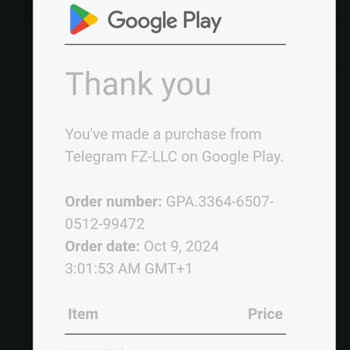
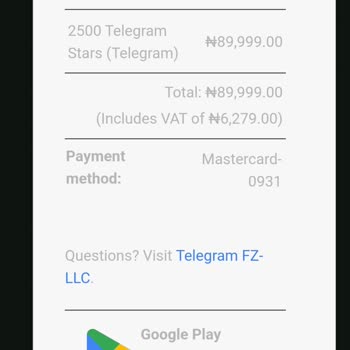
I recently purchased 2500 in-app stars from Telegram through Google Play, but despite the payment being completed, the s...tars did not display in my account. I've contacted both Google and Telegram to remedy the issue, but I'm caught between the two. Google claims the scenario does not fit under their
Google Play is causing payment and refund issues. They're deducting more than necessary and refunding less. On June 15, ...2024, I purchased an app from Google Play for 250 TL. Not satisfied with the app, I contacted them before the 15-day refund deadline. I've been struggling with their technical supp






1 Comment