I received a notification that my WhatsApp password was changed. How can I recover a hacked account?
82 Views
1 Comment71 Complaint
If you receive a WhatsApp password change notification and suspect unauthorized access, follow these steps to recover your account:
• Check your phone number: Login with your phone number. Enter your 6-digit SMS verification code to verify your phone number.
• Stop unauthorized access: Your account holder will be logged out after entering the 6-digit SMS code.
• 2-step verification (if enabled): A two-step verification code may be required. Logging in without the code may take 7 days. After entering the 6-digit SMS code, the other person will be removed from your account regardless of two-step verification.
• Check email: WhatsApp notifies you by email if your password or phone number changes. Check your inbox and spam folder for suspicious WhatsApp emails.
• Check login alerts: Confirm your WhatsApp login notifications match your recent activity. Unusual logins are suspicious.
Account recovery:
• Open WhatsApp and log in with your old phone number to check for unauthorized access.
• Request a new verification code by selecting "Forgot PIN". Deactivating the hacker's access lets you take control.
Contact WhatsApp support:
If you can't get the verification code, contact WhatsApp support immediately. Consider using your phone to log out of all devices for added security. WhatsApp alerts you when someone tries to sign in with your phone number, adding security.
Got more to say? Leave a comment to continue the conversation.
My WhatsApp account was compromised on September 12, 2026; my profile picture changed, and I became unable to send messa...ges to anyone, just as others could no longer message me. Meanwhile, I started receiving callbacks from unknown numbers saying, "You called me," which made me deeply concerned. I f
I have been experiencing unauthorized logins and unfair restrictions on my WhatsApp account for the past three days. Eve...n though I do not log into my account, issues such as appearing online, app slowdowns, and continuous login attempts by unauthorized parties are occurring. Yesterday morning, someo
I have been using WhatsApp on my Android phone with the number +961812273** in Lebanon since 2018 without any problems u...ntil the night of 31 August 2026, when my account was suddenly hacked and then permanently banned. When I try to open WhatsApp, I only see the message “This number can't use WhatsA
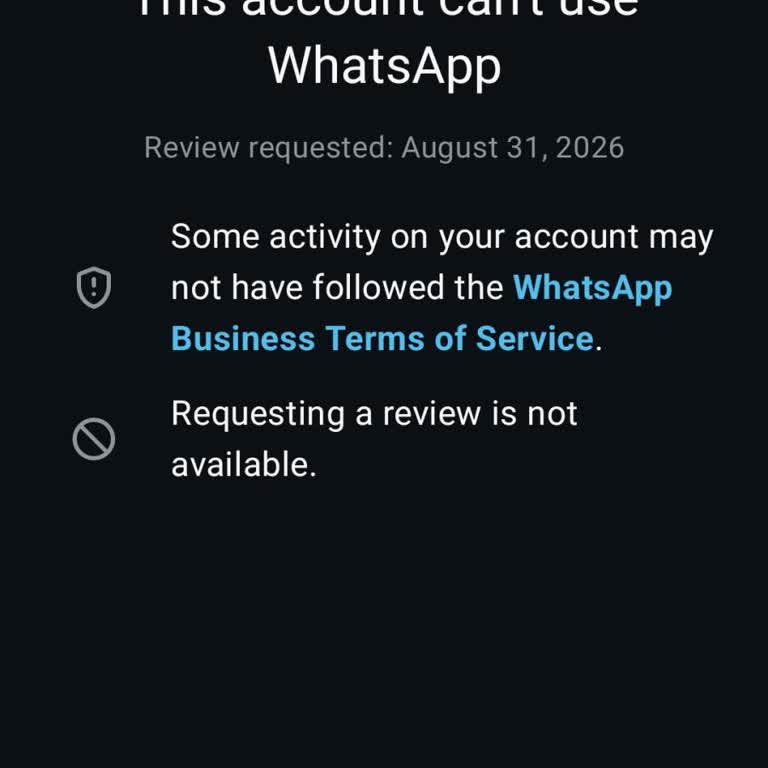
My WhatsApp account linked to the number 73699517** has been banned for the last 6 days. On the screen it says that my a...ccount violates WhatsApp’s age requirement and it only allows me to register a new number. Before this happened, someone else logged into my WhatsApp account after I shared my What
I use WhatsApp on my Oppo A3 Pro 5G phone and my WhatsApp account was hacked about two hours ago after I mistakenly shar...ed the one-time password (OTP) that was sent to my number. Right now I cannot log back into my WhatsApp account and I have completely lost access. The person who took over my accou
I am a WhatsApp user in Togo and I am contacting you regarding a very serious security problem with my account linked to... the phone number +228964030**. My WhatsApp account was hacked three times in August 2026, even though two-step verification was activated the whole time. After these incidents, my
I have been using the WhatsApp mobile app linked to my phone number 951 380‑2*** without any issues until 14 August 2026.... After that date, it appears that my WhatsApp account was hacked and the email address associated with it was changed without my consent. Now, whenever I try to open WhatsApp, I a
I am writing regarding my WhatsApp account associated with the number +91 7708849***. My previous WhatsApp account on th...is number was hacked and then deleted, and now a new account is appearing on the same number without my permission or control. This number is important for my work and business com
I am using a Zong number in Karachi and my WhatsApp account linked to this number has been hacked and stolen. When I try... to set up or recover my WhatsApp account, the setup wizard does not even show the SMS verification option, so I cannot receive any code and my WhatsApp is not working at all. This
My WhatsApp account linked to the number +233 55 657 70** has been hacked. About two weeks ago, I was logged out of my W...hatsApp on my Android phone, and since then, the attacker has been using my account to send messages to my contacts without my permission. I have not been able to take any recovery
My WhatsApp account linked to the phone number 84602298** was hacked on 15/05/2026. Without my knowledge or consent, app... links and images were sent from my account in a WhatsApp group, which has caused me serious concern and embarrassment. I have tried to reach out, but I have not received any respo
I have a serious security problem with my WhatsApp Business account and I am not getting any proper help through the nor...mal channels. My Business WhatsApp, registered to the phone number +5977135***, has been hacked. The hacker is using the number +62 85862246*** and since February my account has be
I am using WhatsApp Business with the phone number 9612995*** in India and I want this account to be closed immediately.... Someone else is using my number on WhatsApp Business without my permission, and I am very worried about misuse of my identity and my contacts. I request that you urgently disable
I am using WhatsApp on a Redmi 9 Pro phone, and on April 11, 2026, at around 2:00 PM, I noticed that my account appeared... to have been hacked. Messages were sent to my contacts without my consent, including inappropriate photos that I did not share or approve. These actions seriously damaged my reput
My WhatsApp account linked to the phone number 0033766644*** has been taken over without my consent and I have completel...y lost access to it. I live in France and this situation is causing me serious concern. A person I trusted gave me an email address and I opened it on my phone. While I was in the
I am writing to request the permanent deactivation of my WhatsApp account linked to the number +966 5652511**. My iPhone... was stolen in Saudi Arabia around September 16–17, 2025, and since then, the person who has my stolen phone has been using my WhatsApp account without my permission. The individu
I use WhatsApp on my Samsung Note 10, and since yesterday, I have not been able to log in to my account. The app keeps s...howing a message saying that I need the official WhatsApp to log in, even though I have never used any modified or unofficial WhatsApp application on this phone. To solve the probl
My WhatsApp account linked to the phone number 72559986** is not logging in, and I am unable to use WhatsApp on this num...ber. I do not know the reason why my account is not working. I kindly request that my WhatsApp account associated with 72559986** be checked and reactivated so that I can use What
I have been unable to log in to my WhatsApp account for 3 days, despite using the official WhatsApp application on my Op...po Android phone. Every time I try to log in, I receive a message telling me to download the official WhatsApp, but I have already downloaded and installed multiple official versio
I use WhatsApp on my Android mobile number 799 229 2***. Two days ago, my WhatsApp account was suddenly blocked without ...any clear reason. I have never shared any obscene, vulgar or inappropriate content, and I have also not shared any political content or violated any rules to my knowledge. After my
I have been unable to log in to WhatsApp with this number, 7008538***, for the past month. I kindly request your help re...garding this issue, as I have many important contacts linked to this number. Please look into it and resolve the problem. When I try to log in to WhatsApp, it displays a message sa
I don’t know what happened to my WhatsApp account, but it was suddenly banned. Please, I would be very grateful if you c...ould restore my WhatsApp account. This is my phone number: +2349029045***. I need it urgently and would deeply appreciate your help.
On October 17, 2025, at 01:29 a.m., I received a message on my phone stating, “An account belonging to you (WhatsApp) is... being registered on a new device.” A verification code was also sent. When I woke up in the morning and opened the app, I realized that I had been logged out of WhatsApp. During
I haven’t been able to access my WhatsApp account on my Android phone for about a month and a half. Every time I try to ...log in, I receive the message: “This account can no longer use WhatsApp.” The only thing I had installed prior to this issue was a GIF app — I haven’t violated any WhatsApp rules i
My WhatsApp is not working right now, and my contacts keep sending me messages that appear as read with blue ticks, even... though I never received them. In addition, my profile picture was changed by someone I don’t know. I urgently need to access my WhatsApp account, but I keep getting unhelpful auto


























1 Comment