Xolvie Resolution Specialist25 Eylül 2023 06:41
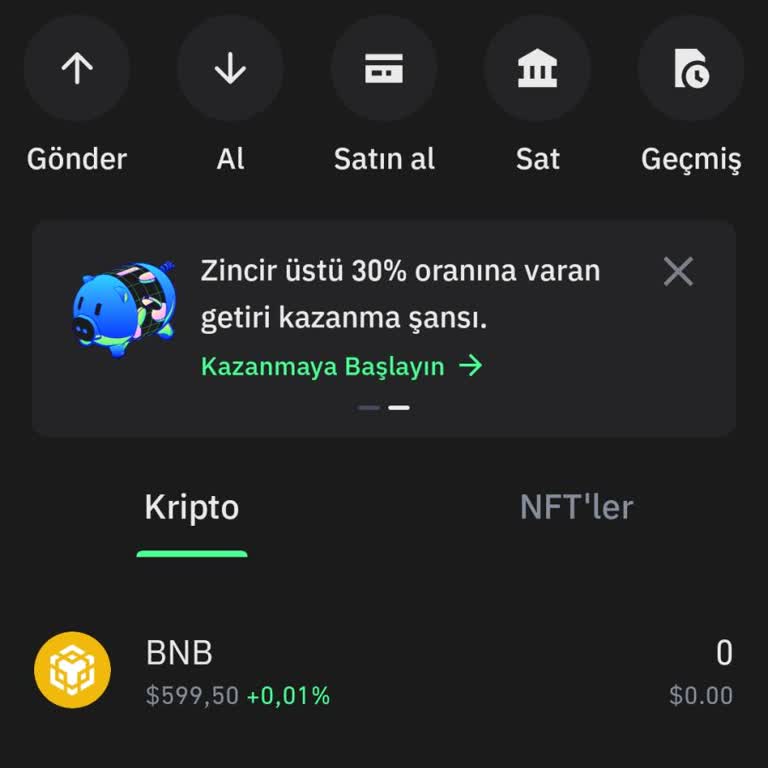
A "reset balance" is when a cryptocurrency wallet like Trust Wallet resets its balance to zero or a lower value. Technical issues, accidental actions, and security breaches can cause this. When a balance is reset to zero, the wallet loses all its assets and funds and starts over. There are two ways to get back the money you put into your Trust Wallet after it was reset:
If the wallet is reset by the user:
• Launch Trust Wallet, then select "Settings" from the menu that appears.
• Click the menu item labeled "Wallets."
• Pick the wallet that needs to be restored.
• To bring back, select "Restore."
• Put in your passphrase here.
• Simply click "Restore" once more.
• Your wallet's balance will be reinstated once the backup is loaded.
Keep your recovery phrase secure and secret, as it is the only way to restore your wallet if it is lost or stolen.
If someone else's actions caused your coin balance to reset to zero:
Try updating or reinstalling it to see if that helps.
If the issue persists after trying this step, contact Trust Wallet support and describe the problem in detail.
You can also ask for help from users who have encountered and solved similar problems here on Xolvie
Vote
Related Complaints
247K USDT Disappeared from Trust Wallet After Update

October 13, 2025 10:13 PM
Since October 3, 2025, I have been unable to access my 247,686 USDT balance in the Trust Wallet app. While using the app... on my Android phone, I did not receive any warning or error message. During this time, a person claiming to be an inspector contacted me and stated that my funds were blocked, al
I Can’t Access My Trust Wallet Account After Logout Because I Forgot Recovery Phrase

August 22, 2025 2:07 PM
Since last night, I have been locked out of my Trust Wallet mobile app account after logging out. The problem is that I ...no longer remember my 12-word recovery phrase, which means I cannot regain access to my wallet. This has left me extremely frustrated, especially since I have a balance of $243.77
I Can’t Access My Trust Wallet—Recovery Phrase Rejected and Support Is Useless

April 29, 2025 9:25 AM
I’m having a serious issue with Trust Wallet—my recovery phrase is no longer working, and I’ve lost access to my wallet.... I stored my seed phrase securely in Google Drive, and I’m 100% sure I typed it correctly. Yet, Trust Wallet keeps rejecting it. This makes me fear that my wallet may have been com
I Can’t Reach Trust Wallet Support or Fix Basic Wallet Recovery Issues

April 21, 2025 4:33 PM
I’m deeply disappointed with the level of support and functionality provided by Trust Wallet. Despite the numerous compl...aints from users, it seems no one is listening, and there is no real support team to talk to. How can an app that handles such sensitive and valuable information be this unresponsi
Unable to Access Trust Wallet Due to Missing 12-Word Recovery Phrase

July 3, 2024 2:30 PM
My Trust Wallet has suddenly disappeared, and I am unable to access it. When trying to log in, I cannot input the 12-wor...d recovery phrase because I was never provided with this code when I registered. As a result, I am locked out of my account, which contains $99. I urgently request assistance to re
Trust Wallet: Funds Reset After Update

May 27, 2024 2:08 PM
I realized that my funds had disappeared following an update that took place a week ago. Since then, I've been checking ...repeatedly, but unfortunately, the issue hasn't been resolved yet, and my balance still displays 0.00. I have full confidence that you will attend to this matter with promptness. I

Trust Wallet
View All Complaints