I suspect that my Ledger device may have been tampered with or replaced. How can I verify its authenticity and security?
1 Views
If you suspect your Ledger device was tampered with or replaced, follow these steps to verify its authenticity and security:
Check the packaging.
A genuine Ledger device never comes with a pre-filled recovery sheet. There should be no card with 24 words already written. If a seed phrase is provided, it’s a scam.
Initial setup behavior.
When turned on for the first time, the device must ask you to either set up as new or restore from a recovery phrase. If it’s already configured, do not use it.
Verify authenticity in Ledger Live.
Connect the device to the official Ledger Live app and open the Manager section. Ledger Live performs a cryptographic authenticity check. A fake or altered device will fail this test.
Never use a pre-generated seed phrase.
Your recovery phrase must be generated only on your device screen.
Inspect the physical condition.
Look for signs of forced opening, glue marks, or unusual damage. Note: Ledger does not use tamper-evident stickers.
If you have any doubts, do not transfer funds. Contact official Ledger Support immediately.
If support does not reply, you might want to consider posting a complaint on Xolvie in order to bring attention to the issue and try to find a solution.
I have used my Ledger Nano S for years because I believed it was secure. When I first bought the device in 2016–2017, I ...wrote down my 24-word recovery phrase on paper and stored it in a safe place known only to me. The device has always remained in my possession in a secure location, and I have neve
At exactly 03:53 AM, every single cent in my Ledger wallet was drained without my permission. I did not share my passwor...d, recovery phrase, or secret words with anyone—yet somehow, a hacker was able to access my wallet and steal all my funds. The stolen assets were transferred to this wallet address
I ordered a Ledger Flex device through the Media Markt mobile app, and it was delivered to me on April 15, 2025. However..., the product arrived with the back cover already open, which immediately raised serious concerns about the security and authenticity of the device — especially since it’s a hardwa
I’ve been using Ledger Nano X to securely store my crypto, but recently I discovered that my Alice Coin was transferred ...out of my wallet without my authorization. The rest of my funds are still there — only Alice Coin was taken. I can clearly see the destination wallet address, so the transaction i
They sent an SMS from 'Ledger' informing me of an attempt to access my ledger wallet. Then they called me from a US numb...er 5 min later and informed me that a big amount of ETH moving attempt had occurred from my account today. They claimed it was from the UK, which is not my location. That's why it
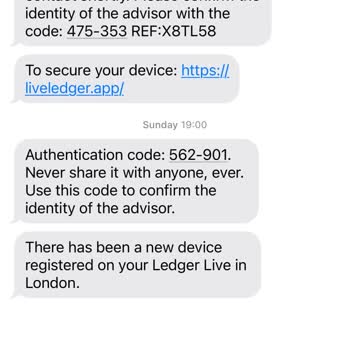
Hey everyone, I could really use your assistance right away. My Ledger Live cold wallet kept my coins safe for approxima...tely one year. On January 2, 2024, I was quite surprised to discover that 12 Ethereum had been transferred from my account to an unfamiliar wallet. The transfer occurred on Decembe
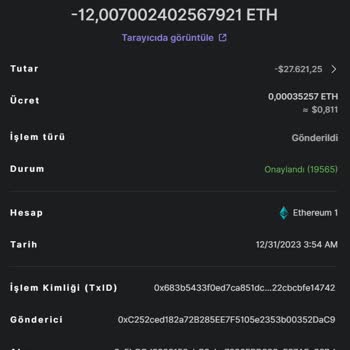
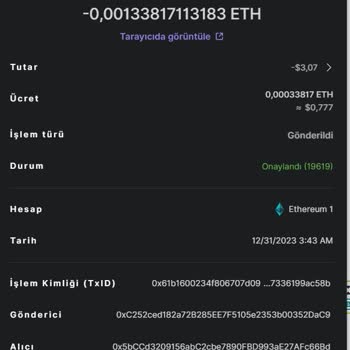


I purchased my Ledger Nano S wallet directly from Ledger in France. It was sealed and had never been opened. I performed... a device reset when it was devoid of any data in order to rejuvenate its 24-word key. Upon transferring my coins, I was dismayed to find unauthorized transactions from my wallet,