Xena Live locked my account and support won’t reply how can I fix this?
14 Views
1 Comment11 Complaint
If Xena Live locked your account and support isn’t replying, and you want to recover access:
Check the login error first;
• Try logging into your account
• Note the message shown, such as:
– “Account locked”
– “Verification required”
– “Suspicious activity detected”
• Screenshot the error message
Check your email (including Spam);
• Search for emails from Xena Live about:
– Account suspension
– Security verification
– Password reset
• Look for instructions to unlock your account
• Screenshot any relevant emails
Try resetting your password;
• Go to Login → Forgot Password
• Enter your registered email or phone
• Follow the reset instructions
• Screenshot confirmation or any errors
Complete any required verification;
• Some accounts are locked due to:
– Identity verification (KYC)
– Phone/email confirmation
– Security checks after unusual activity
• Upload required info and screenshot completion
Contact Xena Live Support again;
• Use in-app support or official email
• Provide:
– Username/account ID
– Registered email or phone
– Screenshot of the locked account message
• Ask them to explain the lock and restore access
If support still doesn’t respond, consider filing a complaint on Xolvie to escalate the issue and push for account recovery.
I am writing regarding a serious problem my fiancé is facing in the Xena Group Voice Party mobile app with her in‑app ta...lent/host agency. Her user ID is 21235395 and she is currently under the agency of an agent whose ID is MI from the agency called "وكالة ملوك العراق". For more than two months, thi
I am writing to complain about the ban placed on my Xena party account. My account, which is linked to the phone numbers... 9712500*** and 7017570***, was banned on 07/07/2026. Since then, I have been unable to open or access my account despite trying very hard multiple times. I do not understand the e
I am writing regarding my Xena Live account, which had reached VIP Level 10 before it was stolen approximately three mon...ths ago. After my account was taken over, someone used it without my knowledge or permission to promote other applications during live broadcasts. I later learned from people I kn
I am writing regarding the disappointing experience I have had with Xena over the past week. During this time, I contac...ted Xena management and the relevant representatives several times in an effort to resolve the problems I was experiencing. However, I repeatedly felt that the information provided
I am using the Xena Live Voice Chart Party digital service and I would like to report a serious fraud incident involving... the user ID 25061***. About one month ago, this ID took over my in‑app assets and I lost approximately 1,000,000 coins and 21,000 in money due to this situation. After realizing w
Hello Xena Support Team, My account on the Xena platform, registered under the ID and username “PK510088 ᗯEᗩᑭOᑎ🍷”, has ...been banned, and I believe this may have happened by mistake. I kindly request that my account be reviewed in detail and that the ban be removed if possible. I always try to follow
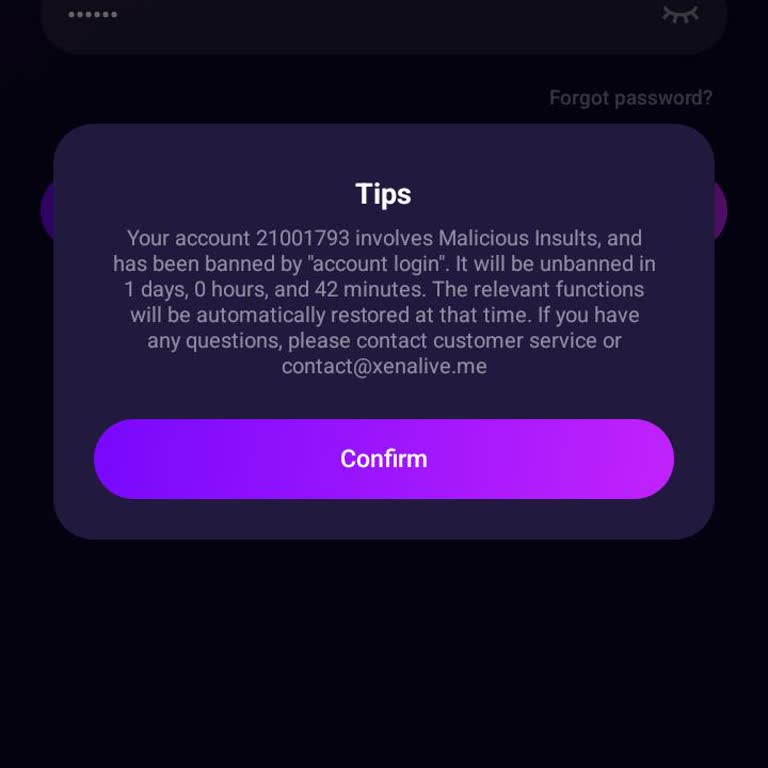
Over the past two years, I made multiple balance top-ups through the Xena app for in-app purchases. However, about three... months ago, my account was banned by the application, and since then I have not been able to access my account. After my account was banned, I attempted to contact Xena through t
I am unable to log into my Xena Live account, and instead, I see the message "harrasment" displayed. I have no idea what... this means, and I demand a solution. When I translated the term into English, it gave a disturbing meaning, but I have never engaged in any inappropriate or offensive conversation
I am unable to log into my Xena Live account, and instead, I see a message saying "harrasment." When I translated this, ...it showed a meaning related to harassment, which is completely unfair and misleading. I have never engaged in any inappropriate or offensive conversations, so I have no idea why my
After joining Xena Live, I started experiencing issues with the agency I was assigned to. Due to these problems, I decid...ed to delete my account, but the platform won’t allow me to do so. I have tried following the instructions, yet my account remains active. To make matters worse, I contacted the p
I can’t access my Xena Live account, and I have no idea why. I haven’t violated any rules, I don’t cause trouble, and I ...stay out of conflicts. Yet, I’m locked out of the platform for no reason. Yesterday, another user insulted and cursed at me, but I didn’t even respond. Now, I find myself unable t












1 Comment