Detectico app charged my bank account without consent, how can I resolve this issue?
40 Views
If Detectico charged your bank account without your permission, you can email Detectico's customer service at [email protected] or go to their website's help part at Detectico Support (https://detectico.zendesk.com).
Clearly explain the illegal transaction by giving information like the date, the amount, and any transaction reference numbers. Ask for a return and more information about how the charge happened.
If you can't get Detectico to fix the problem, you should call your bank and challenge the charge. Give them information about the transaction and let them know it wasn't authorised.
Banks often have ways to reverse payments that were not authorised and can stop the merchant from making more transactions. Make sure your account is safe by changing your passwords and checking your recent behaviour for any other strange charges.
To stay safe in the future, check your bank statements often and set up alerts for all activities. If you think there is a security problem with your Detectico account, you might want to take your payment way off of their platform to stop any more charges that aren't yours.
If you have experienced a similar issue, please feel free to share. You can also file a complaint on Xolvie.
I am writing regarding an unexpected charge of $49.90 that was deducted from my VISA card issued by BIDV Bank in Vietnam... at 23:51 on May 14, 2026, through onlinecontrol.app with transaction code 998356. The only time I used your service was when my phone was stolen, and on that occasion I made a sin
On October 30, 2025, while attempting to purchase a $0.87 trial plan on Detectico’s foreign-language website, an additio...nal $8.38 was charged to my card for an assistant service that I did not intend to buy. In total, two separate charges were made to my account. I immediately contacted the company
On July 3, 2025, at 11:30, a charge of $1 was made on my card through https://www.detectico.com, and this transaction wa...s made with my approval. However, the other transactions that followed were not authorized by me. Immediately afterward, additional attempts were made to withdraw money through POS
I made a purchase for ₺26 on the Detectico website, thinking it was a one-time charge. Just one minute later, I was shoc...ked to see an additional ₺997 taken from my bank account without any warning, confirmation, or explanation. I never authorized this charge. There was no clear notice, no subscripti
The Detectico app appeared on my screen. While trying to pay the $1 fee for a one-day trial, $42 was withdrawn from my a...ccount. This happened in less than five minutes. Because the app is in English, I accidentally approved it, and the money was taken immediately. The app doesn’t work at all; no mat
The Dedectico app appeared on my screen. While trying to pay the $1 fee for a one-day trial, $24 was withdrawn from my a...ccount. It happened in less than five minutes. Since the app is in English, I accidentally approved it, and the money was taken immediately. The app doesn’t work at all; no matter
On March 19, 2025, I subscribed to Detectico by paying ₺29.71, expecting to use its services. However, the platform turn...ed out to be completely useless, and I was unable to use it for anything. After struggling, I finally managed to cancel my subscription—or at least I think I did. I want to make i
I want to cancel my Detectico subscription immediately. This app is completely useless, yet it keeps charging me for a s...ervice that doesn’t work. I did not receive any benefits, and I refuse to continue paying for something that provides no value. Despite multiple attempts, I still have not been ab
I purchased a one-day trial subscription from Detectico, and the price displayed was ₺29. However, when I checked my ban...k statement, I was shocked to see that nearly ₺1200 had been deducted from my account! This is fraudulent and misleading. I did not authorize this charge, and I demand an immediat
I purchased a one-day trial subscription on the Detectico app, which was advertised as 29₺. However, when I checked my b...ank statement, I saw that 997₺ was charged to my card without my consent. This is outrageous and completely misleading. I did not authorize this amount, and I expect a full refund
Detectico unauthorizedly withdrew more money than I approved from my account. I did not consent to this additional charg...e, and it was added without my knowledge. This is a serious issue, and I demand an immediate refund. I expect the full amount to be refunded within one business day. If this does
Detectico charged me over ₺1000 under the guise of a membership fee, even though the actual membership cost is only ₺26.... This excessive amount was taken from my account without any prior notice or explanation, which is completely unacceptable. I demand an immediate refund of the overcharged amount.
An unauthorized charge was deducted from my Detectico account. I paid $0.89 for a 1-day trial, but the app charged $34.9...9 from my account. The app was of no use to me. I requested a refund immediately, but the company only offered a 25% refund of the amount I paid.
I registered with Detectico to find someone’s location, but the service did not work as promised. No location or any use...ful information was provided, yet they charged ₺1,660 from my account. This is completely unacceptable, especially since their initial offer displayed a much lower cost. I demand
I downloaded the Detectio app after seeing a charge of ₺26 advertised, but on December 8, 2024, nearly ₺1000 was withdra...wn from my account without my authorization. This is completely unacceptable and feels like a deceptive practice. I demand a full refund of the unauthorized amount immediately. Th
I subscribed to Detectico on 2024-12-02 by paying ₺26. However, I now want to cancel my subscription, and I’m unable to ...do so through their system. The service has been completely unhelpful, and I feel that the ₺26 I paid was wasted, as I couldn’t use the platform effectively. If any additional cha
I reached out to Detectico (US) because my father's phone was lost. They stated they would charge ₺26.67 for 24-hour usa...ge and that the subscription must be canceled within 24 hours to avoid additional charges. However, just 6 minutes after the initial payment, they withdrew ₺997.92 from my account.
I mistakenly subscribed to Detectico online and immediately tried to cancel the subscription, but the process has been f...rustrating and unsuccessful. Despite multiple attempts on their website, I couldn't find a way to cancel my subscription. To make matters worse, Detectico charged 1489₺ from my acc
Today, I saw a $49.90 charge from a website I don't recognize. I've never used this website before, and I haven't renewe...d any accounts recently. Out of nowhere, this site took $49.90 from my account, which feels like theft. The only time I might have interacted with this site was once when my phone
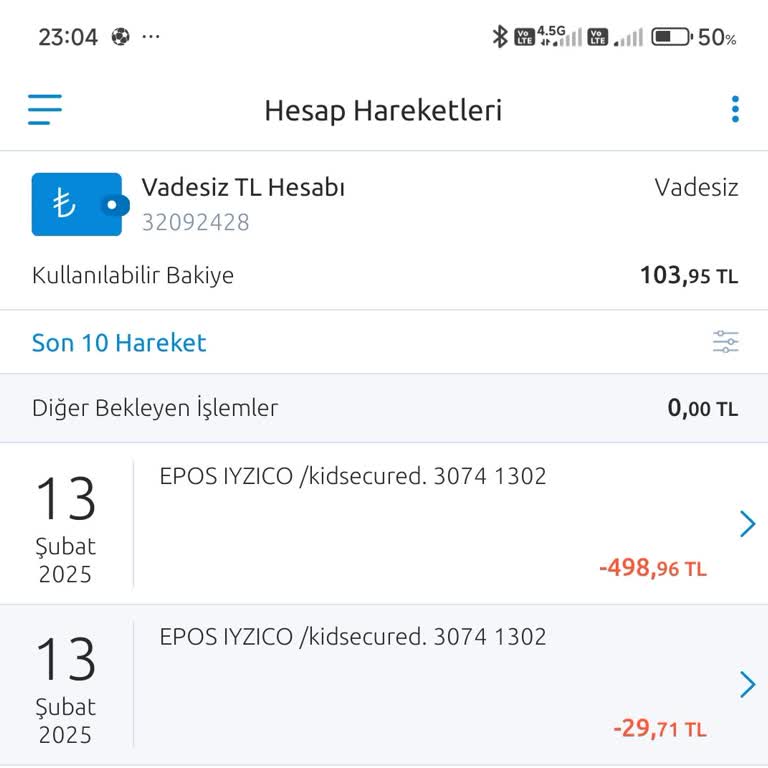
I made a payment of 26 TL on the Detectico site, but an unauthorized transaction of 498 TL was made. The site does not p...rovide services and only shows my location. There are other victims besides me. If this continues, many people will face unauthorized transactions. I demand a refund of my money. O
I was shocked to discover that the Detectico app had deducted 1000 TL from my bank account without any prior notice or a...uthorization from me. I was billed for an application that serves no purpose to me. I kindly request a refund of my money and will bring my concerns to the attention of the appropr
The Detectico location tracking app charged an extra 997 TL from my account, even though the daily trial period was 27 T...L. Additionally, the app does not work. I demand the immediate refund of the unauthorized 997 TL payment. If not, I will exercise my legal rights and file complaints with CİMER, th
Unauthorized subscription activation and funds withdrawals from my account have been initiated by the Detectico mobile a...pp. I would like a refund applied to my account since I have terminated the subscription. Please find a solution to this problem. I appreciate it. Please...
Hello, I want to report an issue regarding the Detectico app, which withdrew an unauthorized amount from my account with...out my knowledge. A payment of over ₺900 was deducted without any code or notification sent to me. I kindly request a prompt and solution-oriented response regarding this matter, a
I want to report an unauthorized charge on the Detectico app. I purchased a 1-day trial for ₺26.67, but without any conf...irmation, ₺798.33 was withdrawn from my account. If my money is not refunded in full, I will have no choice but to pursue legal action. I kindly request an immediate resolution to