I consistently see messages stuck at "Pending..." on Whatsapp. How can I resolve this?
330 Views
Check your internet connection and make sure you have a steady Wi-Fi or mobile data link if you're having trouble connecting to WhatsApp. Changing connections could be beneficial. You can also fix errors and refresh your network connection by simply restarting your phone or turning on and off Airplane mode.
Make sure you're running the most recent version of WhatsApp to avoid app-related issues, as older versions might have messaging-related bugs. On Android, go to Settings > Apps & notifications > WhatsApp > Force stop; on iOS, swipe up to shut down the app entirely. Both methods will force stop and restart the app.
Without affecting your chat history, clearing the WhatsApp cache on an Android device can be helpful. Go to Settings > Apps & notifications > WhatsApp > Storage & cache. Reinstalling WhatsApp (after backing up your chat history) may be your only option if problems continue.
WhatsApp may hold messages until the recipient comes online, so if you're having trouble sending a message, make sure the recipient is online. Verify the recipient's phone number to make sure there are no misunderstandings.
For additional troubleshooting, you can report the issue to WhatsApp support if none of the suggested fixes work. Trying these steps in order can help identify the root cause and fix the "Pending..." message issue. Keep in mind that the specific cause of the problem may determine the most effective solution.
If you've found these suggestions useful, consider leaving a comment to let us know.
Since around 8:00 AM today, I have been experiencing a serious issue with message delivery information in the WhatsApp a...pplication. Even though I am actively chatting with the other person in real time, all of the messages I send remain stuck on a single gray tick. I cannot see double ticks or read
I use WhatsApp on an Android phone with the number +919971028***. About one month ago, my WhatsApp account was banned an...d then unbanned, but since then I still cannot send messages properly, I have lost my chats, and I have not received any explanation about what happened. This situation makes me wo
Dear WhatsApp officials, can you please help me? My WhatsApp has been blocked. My mobile number is 9023967*** and my nam...e is Jyoti M***. I really need to access my WhatsApp account urgently. I keep receiving unhelpful replies from the automated response system, and I cannot log in with my phone numb
On my Samsung S25 FE, for the past day I have been unable to log into WhatsApp. The app is permanently stuck on the “Con...necting” screen and I cannot access my account. I’m not seeing any error messages—just that screen. Other apps work fine and I have no general internet connectivity issues. To try
For the past five days, I have been unable to complete the setup of WhatsApp on my Samsung S23+ after updating the app. ...When I reach the profile step, the screen only shows “Connecting” and the installation never finishes. I have already tried reinstalling the app, restarting my phone, and using bot
I use WhatsApp on my iPhone 11 with a Vodafone line in Istanbul/Sultanbeyli, and until yesterday I could regularly make ...video calls with a specific contact without any problem. Starting this morning, however, the video call no longer connects. The screen shows “Connecting,” but the call never starts
Since this morning, I have been unable to make voice or video calls with one specific friend on WhatsApp. When I initiat...e the call, the screen only shows “Connecting” and keeps ringing, but the call never reaches them. When my friend tries to call me, the incoming call shows up, but I cannot answer—
Hey there, WhatsApp is not working right now, and I'm not getting good help from their customer support. I really need t...o get into my WhatsApp account right away. I keep getting unhelpful replies from the automated response system, and I can't log in using my phone number. Only this phone number has
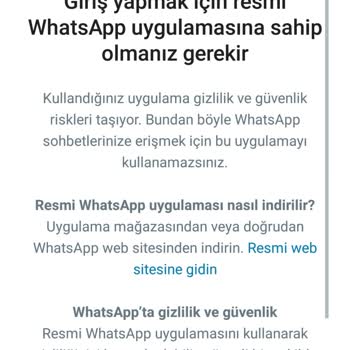
I urgently need to access my WhatsApp account, but I keep getting an error message saying, “You need to use the official... WhatsApp app to log in,” even though I already have the official app installed and updated on my phone. This issue is preventing me from accessing critical conversations. I’ve tr
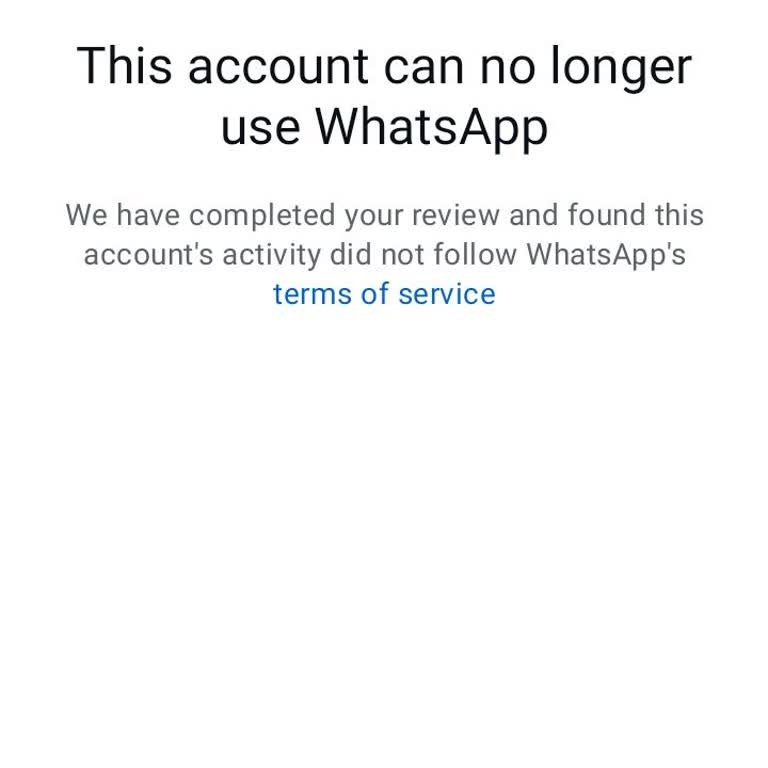
I can no longer access my WhatsApp account, and I have no idea why. I received a message stating: “This account can no l...onger use WhatsApp due to spam.” This is completely unjustified. I haven’t done anything that could remotely be considered spam. I use WhatsApp for personal and professional commu
Whatsapp is flagging me as spam for two days -with intervals. The first was yesterday noon, my account was accesible by ...6 pm. Then the same thing happened now. I am a master student. I conduct a study which is all over the country. So I need to send surveys. Even if I include my official documents i
I can't access my WhatsApp account, as it keeps prompting me to download the official app, even though I’ve already inst...alled, reinstalled, updated to the latest version, and tried on another device. I’ve restarted my phone multiple times, but nothing works. This issue needs an urgent resolution. W
I'm facing a serious issue with my WhatsApp account that I urgently need resolved. Every time I try to log in, a message... appears telling me I need to download the official WhatsApp app. I've already installed, uninstalled, and reinstalled the official app multiple times, ensuring it's the latest ver
Having trouble accessing the WhatsApp application. I keep getting these annoying notifications from some unofficial and ...purple WhatsApp. Ugh, it's so frustrating! Ugh, it's just constantly throwing errors. Hey, I would really appreciate it if you could lend a hand. It's so frustrating when it shuts
I recently changed my phone number due to a WhatsApp spam block, but the app continues to block me and apologize for the... inconvenience. What steps do we need to take to achieve a permanent solution? Can you help me with this issue? What can we do about the problems caused by WhatsApp's own errors w
I received a message via WhatsApp saying "hello" from the number +260 765618745, which belongs to the country of Zambia ...with the country code +260, on May 30, 2024. I have no personal or commercial relations with this country. I have blocked the number and the message sent to me. I am very disturbed
Over the last month, I've been dealing with a frustrating issue on WhatsApp. Even though I can log in from other devices..., I can't seem to access it from my own device. Instead, I am prompted to download the official WhatsApp app. This problem is quite bothersome because it's affecting my usage of th
While trying to create a group (consisting of 5 friends with no different numbers), the application suddenly gave an err...or and logged me out. I submitted a review request after being spammed. After 7-8 hours, it was realized that there was confusion and the login screen opened again. I entered my nu
I've been having trouble accessing WhatsApp for some time now, consistently running into errors with the official app. E...ven though I'm using the official version, I encounter this problem on various devices, eliminating the possibility of it being specific to any particular device. Occasionally, I a
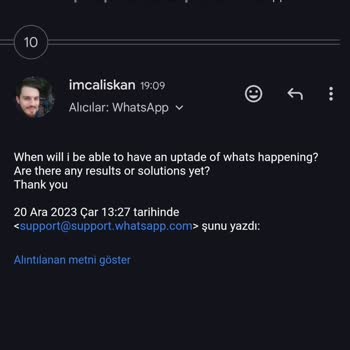
For the past month, my WhatsApp account has been unjustly closed due to spam allegations. I reported the wrongful spam a...ccusations to WhatsApp support. Upon their response, I received a message stating, "We apologize for the mistake," and my account was temporarily reopened. However, it was subseque
I got banned for creating a WhatsApp account and bulk messaging contacts. Despite multiple messages and emails, no respo...nse has been received. Just like talking to a brick wall. I don't know when or if my account will be restored. The whole situation is puzzling. Despite my repeated explanations, it
I encountered such a problem while logging into the WhatsApp application and WhatsApp is very important to me. Help as q...uickly as you can. I reset my phone and after resetting I encountered this error. I cannot log in in any way. I was using it without any problems before the reset, but I cannot use
My iPhone 6 is up to date, and I just installed the most recent update for WhatsApp. But since the update, I can't use W...hatsApp when my phone's cellular data is on. I've turned off and on my phone several times and even removed and reinstalled WhatsApp, but the problem is still there. I've seen that