My connecting flight was delayed, and I missed the subsequent flight booked through Kiwi.com. How can I ask for a refund?
16 Views
If a delay in your connecting flight prevented you from making a subsequent flight reservation through Kiwi.com, take these steps to request a refund:
• Get into your account:
Log in to your Kiwi.com account if you're traveling right now and delays are affecting your connections. Select "Going to miss your connection?" when you see your trip details. This will give you advice on what to do as well as details on your options.
• Reach Kiwi.com Straightaway:
If there are problems with connecting flights, Kiwi.com suggests that travelers get in touch with them directly. The "Contact us" page and the bottom of all FAQ articles have ways to message or call Kiwi.com. You can find the phone numbers on your electronic ticket as well.
• Kiwi.com Promise:
The company will provide you with alternate options or a refund for the affected flights if you are covered by the Kiwi.com Guarantee. This guarantee is intended to offer remedies in the event that your trip is interfered with or has problems.
• Verification of the Delay:
Before offering additional support, Kiwi.com agents might need to manually verify the delay if it is not automatically apparent in the company's systems. Make sure you provide Kiwi.com with the specifics of the delay so they can properly verify it.
• Give information about boarding:
Tell Kiwi.com when you plan to board the delayed bus, train, or flight so they can look into other options that fit into your schedule.
• A Word of Caution About Self-Booking:
Kiwi.com may in some circumstances suggest that you make your reservations for a substitute at the station or airport. It's imperative, though, that you don't make any reservations before confirming with Kiwi.com representatives or settling on a refund. Your eligibility for the Kiwi.com Guarantee may be impacted if you make a reservation without confirmation.
If you have additional information or insights, don't hesitate to share in the comments.
I am contacting you regarding our booking no. 765589198 for the trip from Lyon to Bolivia made via your platform Kiwi, f...or which we are facing several difficulties that we find incomprehensible and particularly prejudicial. First, we requested a refund for medical reasons. A health problem prevented
I booked an itinerary from Amman to Berlin with booking number 748 750 717 through Kiwi.com, including their advertised ...“Connection Protection.” The trip on 7 March 2026 required a self-transfer at London Stansted from Royal Jordanian flight RJ113 to Ryanair flight FR2788 (operated by Malta Air). Th
I purchased a round-trip flight from Ankara to Belgrade with Air Serbia through Kiwi.com, scheduled for October 14–17, a...nd paid ₺5,600 via credit card. On August 12, I was informed that my flight had been canceled, and Kiwi.com stated that the refund would be processed within two months. However, d
On September 9, 2025, I booked a multi-leg flight through Kiwi.com with Lion Air from Denpasar to Jakarta, then connecti...ng to Mumbai and Istanbul. Unfortunately, I experienced a serious issue with this trip. My first flight, which was scheduled for 1:10 PM, was delayed just 3–4 hours before departu
On October 13, 2025, I purchased a ticket through Kiwi.com to fly from Konya to Istanbul, and then from Istanbul to Shar...m El Sheikh with Turkish Airlines. My booking was supposed to include transfer protection. However, this morning I received a message from Turkish Airlines stating that my Konya–I
On August 20, I booked a multi-leg ticket through Kiwi.com for the route Brussels–Istanbul–Kayseri–Istanbul–Riyadh and a...lso purchased a 15 kg baggage allowance. My first three flights went smoothly. However, on the final leg from Istanbul Airport to Riyadh with Flynas, the baggage allowance did not
I purchased a ticket on Kiwi.com for AJet flight VF4179, scheduled for July 21, 2025, departing from Şanlıurfa to Ankara... at 09:50. Shockingly, the flight was canceled, and I was only informed via a single email sent at 5:55 AM that same morning. As I was already preparing for my trip at that time, I
We purchased a return ticket from Montenegro to Istanbul through Kiwi.com. While the airline did change the flight time,... and the Kiwi app notified us of that, there was absolutely no notification—no email, no message—about the airport change. We unknowingly went to the wrong airport, only to discove
Dear Kiwi.com Support Team, We had to cancel a flight booked through Kiwi.com with a total cost of ₺12,000. However, we ...were refunded only ₺200, which is extremely low compared to the amount paid and has caused us significant inconvenience. We followed all the necessary cancellation steps through yo
On April 16, 2025, I purchased a multi-leg international flight through Kiwi.com from Ankara Esenboğa Airport to Guatema...la for a total of ₺33,231.61, excluding the international departure fee. The route included three layovers: Pegasus: Ankara (ESB) → Istanbul Sabiha Gökçen (SAW), 18.04.2025 at 05:
On October 25, we booked a connecting flight from Ankara to Dubai through Kiwi.com. Our Dubai flight was scheduled for 1...0:00 AM. After landing from our first leg via Istanbul, we headed straight to the gate, only to find it had closed two hours early. Despite having valid tickets, we were denied boa
We purchased a flight ticket through Kiwi.com for July 21st for me and my spouse. The itinerary was a connecting flight ...from Ankara to Malta via Ankara-Istanbul-Skopje-Malta. Due to a delay in Ankara on the day of the flight, we checked in online for the following flights. However, the reservation c
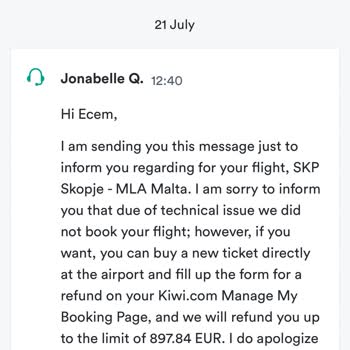
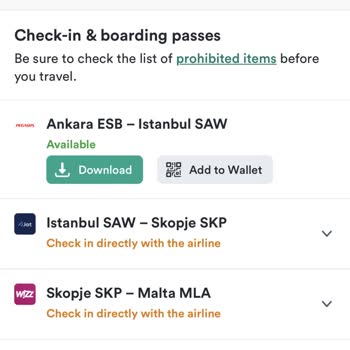
I found a reasonably priced ticket on Kiwi.com and purchased it despite the multiple layovers. However, the flights were... not connected, and the plane was delayed by 2 hours. This led to further problems, and my second connecting flight was canceled. Out of a total of 4 flights, I requested a cancell
I booked a connected flight on Kiwi.com, but one of the flight schedules was changed by the airline by more than 16 minu...tes. At the time of booking, I was provided with a "Kiwi Guarantee." According to civil aviation regulations, if a flight is rescheduled by more than 16 minutes, the airline is obl