Xolvie Resolution Specialist31 Temmuz 2025 18:55
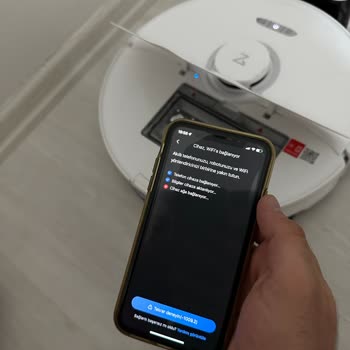
If your Roborock has lost Wi-Fi and will not rejoin, first reset the Wi-Fi by pressing and holding both the "Spot Clean" and "Dock" buttons (or the reset combo for your model) until the Wi-Fi indicator flashes.
Then, in the Roborock app, delete and re-add the device, making sure your phone is linked to a 2.4GHz Wi-Fi network rather than 5GHz, as Roborock does not support 5GHz bands.
Also, make sure the robot and router are close enough for a strong connection during setup, and turn off any VPNs or firewalls that may interfere.
If the problem persists, restart your router, update the app, and verify your phone's Bluetooth and location permissions, which are required for pairing.
If it still won't connect, contact Roborock support for regional service assistance or a possible firmware issue.
If the issue persists, share your experience and consider filing a complaint on Xolvie to seek a resolution.
Vote
Related Complaints
Roborock S7 Has WiFi and Sensor Issues and Service Blames Detergent Use

February 16, 2025 11:25 PM
I bought the Roborock S7 vacuum cleaner from Media Markt 1 year and 11 months ago, and now it has both Wi-Fi connection ...and sensor errors. I sent it to the service, but they returned it with the absurd excuse that detergent was used. Of course, I sent it back again. I only used detergent for the rob
Roborock Smart Vacuum Software Error

January 19, 2024 1:03 AM
In November, I decided to buy a Roborock smart vacuum and thought it would be a good idea to get extra insurance just in... case. Regrettably, a mere week after purchasing the device, it experienced a software error, necessitating a warranty claim. Surprisingly, when the device was returned, it was giv
Roborock S6 Max Started Malfunctioning After a Year

November 29, 2023 1:52 PM
Roborock S6 MaxV robot vacuum, which was Ok at first is now just giving me hard times rather than ease and comfort. It's... only been a year since I bought it, and it's already acting up. It can't seem to find its charging station, and despite trying all the suggested methods, it's safe to say none of
Roborock S8 Robot Vacuum Cannot Join Wireless Network

November 20, 2023 9:44 AM
I purchased the Roborock S8 model from Teknosa. During the installation process, we consistently encountered an error in...dicating that the device couldn't connect to the network. Despite configuring all the settings related to our Wi-Fi and internet, the device still failed to establish a connection.

Roborock
View All Complaints