Xolvie Resolution Specialist21 Mart 2025 12:53
First, ensure your device has sufficient storage space; inadequate space can hinder the export process.
Additionally, verify that both your device's operating system and the CapCut application are updated to their latest versions, as updates often include essential bug fixes and performance improvements.
If the problem persists, consider clearing the app's cache to eliminate any corrupted data that might be causing the error.
On Android devices, this can be done by navigating to Settings > Apps > CapCut > Storage > Clear Cache.
For iOS users, reinstalling the app can achieve a similar effect.
It's also advisable to close any background applications during export to allocate maximum resources to CapCut, ensuring a smoother process.
Should these steps not resolve the issue, reaching out to CapCut's customer support is recommended.
Providing detailed information about the error, your device model, and the steps you've already taken will assist the support team in diagnosing and addressing the problem more efficiently.
If the problem remains unresolved, consider filing a complaint on Xolvie to raise awareness about the issue and inform others.
Vote
Related Complaints
I Report CapCut Pro Feature Bug: Cannot Save Edited Video

July 3, 2025 2:16 AM
While working on my edit in CapCut, the application is erroneously indicating that I've used a Pro feature, even though ...I haven't. This prevents me from saving my edited video. I have meticulously checked every single section of my edit and can confirm that I didn't even access the effects section d
CapCut Now Forces Me to Upgrade to Pro Just to Export Videos After 4 Months Free

May 3, 2025 9:34 PM
I’ve been using CapCut for the past four months completely free—no subscription, no limitations. During that time, I was... able to edit and export my videos without any issues. Everything worked perfectly, and there was never any mention of restrictions. Suddenly, the export feature started showing a
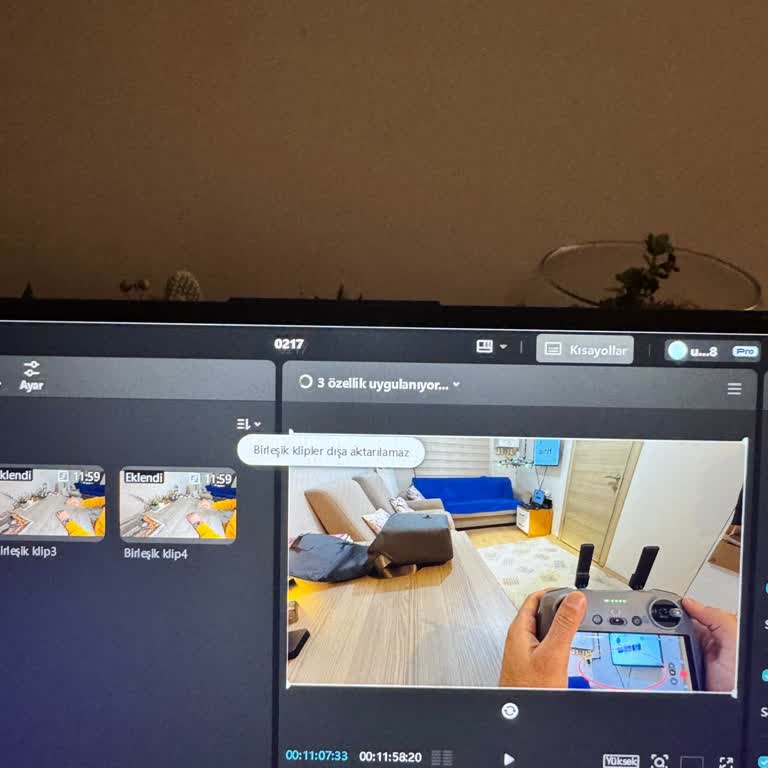
CapCut Won’t Export Merged Clips – How Can I Fix This?

February 17, 2025 11:31 AM
I am experiencing an issue with CapCut, where I get an error saying "merged clips cannot be exported." I recently purcha...sed the Pro membership, uploaded my videos, and attempted to export them, but this error keeps appearing. Previously, I had no issues exporting videos, and I don’t understand why
CapCut Export Issues and Overuse of Pro Features Limit Usability

December 9, 2024 5:03 PM
I downloaded CapCut after hearing good things about it, and initially, everything seemed fine. However, when I tried to ...save or export a video, I encountered several problems. The export wouldn’t work, and I also ran into watermark issues. Additionally, almost every feature now requires a Pro subscr
CapCut Pro Subscription Paid, But Features Unavailable

October 5, 2024 12:24 PM
I purchased a monthly subscription for CapCut Pro, but every time I try to export my edited videos, I get a notification... telling me to subscribe to CapCut Pro. When I attempt to purchase the subscription again, it says that I'm already a subscriber, yet I still can't use any of the Pro features. Thi
Unable to Purchase Capcut Pro Subscription

September 4, 2024 8:55 PM
Hello, today I attempted to purchase a Capcut Pro subscription, but each of my three attempts resulted in an error, alth...ough the payment was still deducted from my account each time. The charges were eventually refunded, but I am still unable to successfully purchase the Pro subscription. I rely on
Unable to Save Edited Videos on CapCut Despite Non-Usage

June 12, 2024 6:28 PM
Despite not using the Pro features on CapCut, the app refuses to save my video. I used the Pro feature once, then delete...d it. There's no Pro feature anywhere in my project, yet I can't save the project. I've spent so much time editing this video, but I can't download it. I can't download it, I can't

CapCut
View All Complaints