Mapping Error with Philips Homerun 3000 Series Robot Vacuum
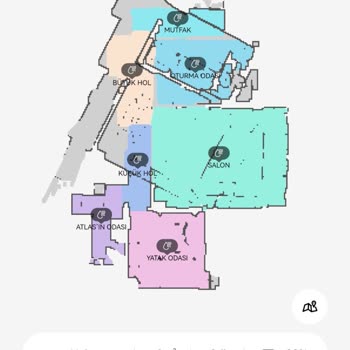

We're encountering a mapping error with our Philips Homerun 3000 Series robot vacuum. After mapping completes, the device's map shifts to the left as shown in the attached image. I've tried reinstalling the app and redoing the mapping process from scratch, but the problem persists. The device is only about 4 months old. I would appreciate information regarding this issue. It's frustrating to deal with such a significant flaw in a relatively new product. I rely on this vacuum to keep my home clean, and this error is hindering its effectiveness. Any assistance in resolving this matter promptly would be greatly appreciated.

Dear Consumer, Thank you for your comment on the Şikayetvar.com website. Regarding the issue, especially when you experience wifi connection problems and mapping issues, please make sure to install the Tuya Smart application and check. I am sharing the steps on how to proceed: ''Check the device software update control with Tuya Smart. Create a Tuya account. Enter the code sent to your email address and create a personal password. Approve the application permissions and click the go to application button. Click the add device button on the Tuya Smart screen. The modem will be pre‑selected, enter the modem password. After selecting small home appliances from the right menu, click the smart robot vacuum (Wifi) option. After passing the next options, select AP Mode. Press the two buttons on top of the device simultaneously to activate Wifi mode. Return to the application and click the go to Connect option. Connect to the Philips robot wifi network and return to the application again. In some cases, the option to approve the hotspot shield connection will appear while establishing the connection; approve it. After the device connection is established, the Home Run application screen will open through Tuya Smart. The next steps are the same as with Home Run.'' We are happy to assist you with any questions or issues. Best regards, Philips Home Appliances Consumer Advisory Center