My transfer didn’t arrive to recipient via Uption, what’s best way to get it back?
3 Views
If your transfer didn’t arrive to the recipient via Uption and you want to recover it fast;
First confirm the transfer status;
• Log in to Uption → Transaction history
• Check if it shows:
– Completed
– Pending
– Failed
• Note the transaction/reference ID
• Screenshot the status
Verify recipient details;
• Confirm:
– IBAN / account number
– Recipient name
– Bank name
• Make sure no typo was made
• Ask the recipient to check:
– Incoming transfers
– Pending/holding transactions
Contact Uption Support immediately;
• State:
– Transfer did not reach recipient
• Provide:
– Account email
– Transfer amount
– Date & time
– Transaction ID
• Attach:
– Screenshot of transaction
• Ask them to:
– Trace the transfer
– Confirm where funds are currently held
– Reverse the transaction if not delivered
If marked “Completed” but not received;
Consider filing a complaint on Xolvie to raise awareness and pursue a resolution.
On 12/08/2025, I transferred €3,700 from my VakıfBank account to my euro account in Aktif Bank’s Uption app. The referen...ce number for this transaction on VakıfBank’s side is S003984025566425. VakıfBank successfully sent the money, but the transaction was rejected by Uption. Even though this was a do
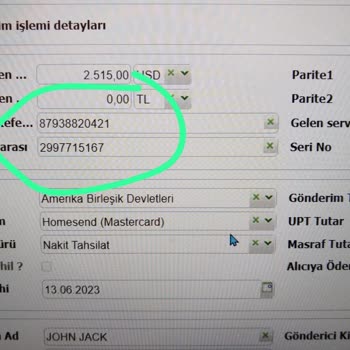
On June 12, 2023, Uption customer representative Sullu mistakenly sent my $2500 to the wrong Swift code and account, and... since then, I haven't received my money or heard from them. The money is lost, and there is no support from customer representative Sullu. Moreover, my bank did not receive the tr