After updating Valorant, the game started crashing frequently, especially during team fights, what’s the best way to fix it?
2 Views
Verify Game Files
Steam: Right-click Valorant in your Steam library, select "Properties," go to the "Local Files" tab, and click "Verify integrity of game files."
Epic Games Store: Launch the store, go to your library, right-click Valorant, and select "Verify."
Update Drivers
Ensure your graphics card drivers are up-to-date by visiting NVIDIA, AMD, or Intel’s website. Outdated audio or network drivers can also cause problems, so check for updates for those as well.
Adjust Game Settings
Lower your graphics settings to reduce the load on your system. Disable overlays from other applications, and verify if recent in-game setting changes could be causing issues.
Check System Resources
Monitor CPU, RAM, and GPU usage during gameplay using task manager. Ensure your system has enough RAM and that your CPU and GPU aren’t overloaded.
Clean Up Your System
Delete unnecessary files, defragment your hard drive, and scan for malware to improve performance and reduce system instability.
These are key solutions that we can offer. If you have more, please share.
Today, after installing the latest Valorant update, the game has been stuck on the login screen for over 2.5 hours and w...ill not launch. I play on a Windows PC, and this issue started immediately after today’s update. I have already tried the following steps: Restarted my computer Uninstalled and
While trying to enter ranked matches in Valorant, the game consistently crashes at the agent selection screen and forces... me out. To make sure it wasn’t a device issue, I even tested on another computer, but the same problem occurred. This shows that the issue is not related to my hardware and is lik
While playing Valorant today, I experienced severe freezing, stuttering, and lag during matches. The game suddenly kicke...d me out and displayed a “system error” message, followed by a warning that my graphics card storage was full. My PC is an Asus TUF with an RTX 4060 GPU and i5 14400F CPU, which sh
Hi, I’d like to share a major technical issue I’ve been facing with Valorant following the latest update from Riot Games.... While this isn’t written in anger, I’m extremely frustrated with the sudden and dramatic FPS drop I’ve been experiencing since the patch was released. Before the update, my syst
After Riot Games updated Valorant to Unreal Engine 5, my system, along with 20 others I personally know, started experie...ncing serious performance issues—specifically tied to the vgk.sys file within Vanguard. Before this update, my powerful setup could easily push 520 FPS, but now it struggles to rea
I’ve been trying to play Valorant, but I keep getting the 0xc0000142 error no matter what I do. My operating system is W...indows 11 Pro 64-bit, and I’ve already reinstalled the game four separate times. Each time, I made sure to completely remove all leftover files, even cleaning entries from Regedit,
Every single time I try to play Valorant, I get hit with the same VAL 5 error, and I’m honestly fed up. This issue has b...een going on for far too long, and it's completely ruining my experience. I’ve lost all motivation to even launch the game anymore because I know it’ll just crash before I can get
Valorant used to run perfectly on my system, but recently it has started throwing constant errors, making the game compl...etely unplayable. Despite reaching out to Riot’s support team multiple times, I’ve received no real help—just generic responses or no replies at all. I’m not the problem here. The
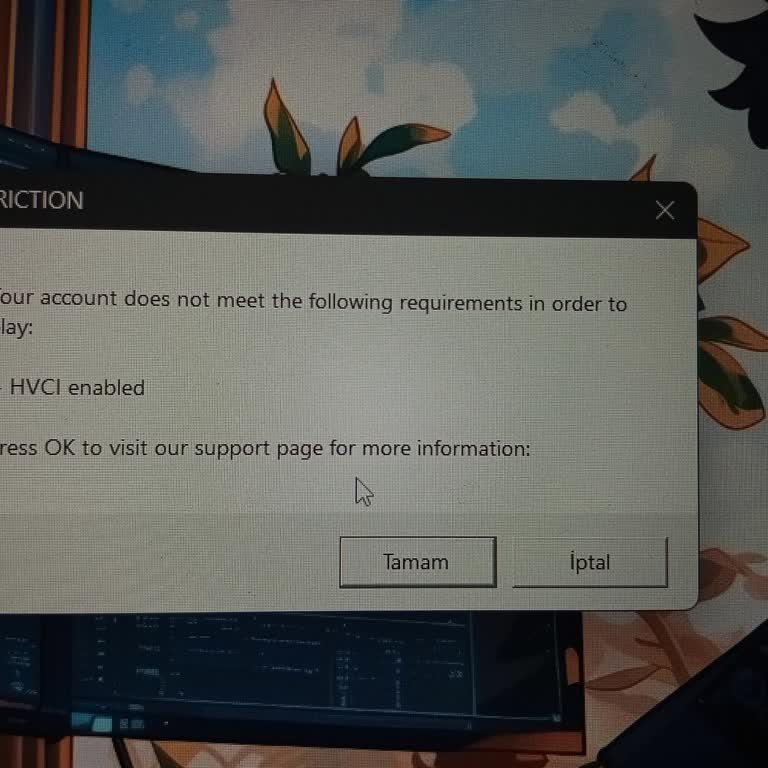
I downloaded Valorant through Riot, but no matter how many times I’ve repaired, uninstalled, and reinstalled the game, i...t simply won’t launch. It gets stuck on the loading screen, then after a short wait, the game closes on its own and throws me back to the Riot Client. I haven’t even been able to p
Whenever Riot Games drops a new update for Valorant, my FPS takes a major hit, and it seems like I'm not the only one de...aling with this issue. The game is experiencing a decline in its player base due to ongoing performance issues. If this trend continues, the player base of Valorant will dwindle.
I'm having some trouble with Valorant since the 9.0 update. It's been 5 days and I used to be able to play the game, but... now I can't access it anymore. I'm experiencing an issue where the game seems to freeze on the loading screen. I've tried multiple solutions, such as reinstalling the game and eve
Ever since the most recent update to Valorant, I've been having trouble getting the game to start up. I've tried everyth...ing: running it in compatibility mode, restarting my computer, even opening it as an administrator, but nothing seems to be working. So, I decided to uninstall Valorant and give it

I'm encountering a recurring issue in Valorant where it disconnects at the startup screen, particularly after the 9.0 up...date. I've reached out to Riot support, even messaging them at midnight, but haven't received a response. I've tried formatting my PC, but it hasn't resolved the issue. My PC specs
Since installing the most recent update for Riot Games' Valorant, I've been unable to access the game. It gets stuck on ...the loading screen without displaying any error message. I've discovered that many others are experiencing the same issue. I contacted the support team, but their responses were un

I can log into my Valorant account, but the game shuts down at the loading screen and won't open. This issue started aft...er the latest update. I need an urgent response. It's not happening to everyone, but some players, including myself, can't access the game at all. A company as large as Riot Games
Due to the latest update, I am unable to access Valorant, and many others are experiencing the same issue. Maintenance w...as scheduled for June 27 at 6:00 AM, but it took much longer than expected. We do not want to face such problems with every update. It seems unreasonable for such a large company t