Xolvie Resolution Specialist6 Aralık 2024 13:30
This issue often arises from the interaction between the display's refresh rate and brightness settings. To address this;
Consider disabling the adaptive brightness feature, which automatically adjusts screen brightness based on ambient light. Navigate to **Settings > Display > Brightness**, and turn off **Auto Brightness**.
If the problem persists, adjusting the screen refresh rate could help. A higher refresh rate can sometimes cause flickering at lower brightness levels.
To modify this setting, go to **Settings > Display > Screen Refresh Rate**, and select a lower option, such as 60Hz, to see if it alleviates the flickering.
Additionally, ensure your device's software is up to date, as updates often include fixes for known issues. To check for updates, go to **Settings > System & Updates > Software Update**, and install any available updates.
If these steps do not resolve the issue, it may be due to a hardware problem. In such cases, it's advisable to back up your data and visit an authorized service center for further assistance.
Remember, you're not alone in your experiences. Explore Xolvie to read about the challenges others have faced and share your story.
Vote
Related Complaints
My Huawei MatePad 11.5 Freezes Constantly and GBox Crashes Prevent App Use

May 20, 2025 12:27 PM
I purchased the Huawei MatePad 11.5 with high expectations, but I’ve been deeply disappointed by its performance. From t...he moment I started using it, the tablet has suffered from constant freezing issues. Most of the time, apps crash as soon as I open them or don’t launch at all. The GBox app, whic
Huawei Ignored Screen Scratches on My Tablet Caused by Manufacturing Defect

April 28, 2025 8:34 PM
I purchased a Huawei tablet, trusting the brand’s quality. Shortly after use, invisible scratches appeared on the screen... — they are not visible under normal conditions, but become clearly visible when the screen is fogged up. Therefore, it is physically impossible for these scratches to have been ca
Huawei MatePad 12.6 PaperMatte Edition Lags Severely When Using CapCut App

April 18, 2025 7:40 PM
On March 20, 2025, I purchased a Huawei MatePad 12.6 PaperMatte Edition 256 GB directly from Huawei.com. Since I often e...dit videos for work, I downloaded CapCut through GBox, a third-party app installer, because it was not initially available on the AppGallery. After some use, I noticed that the ap
Huawei MatePad PaperMate 11.5" Freezes When Adjusting Volume on Streaming Apps

November 1, 2024 6:35 PM
I purchased the Huawei MatePad PaperMate 11.5" tablet two weeks ago and noticed an issue when using apps like Netflix an...d Amazon Prime. Every time I press the volume buttons while watching something, the screen freezes for three to four seconds. Interestingly, this problem doesn’t occur when watchin
Huawei Matepad Screen Damage Warranty Dispute

May 14, 2024 4:10 PM
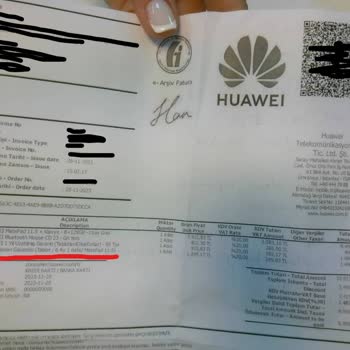
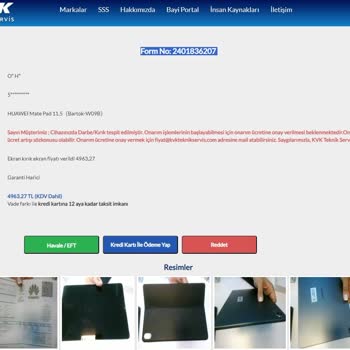
I'm experiencing a frustrating problem with my Huawei Matepad. Even though my warranty is still valid, KVK Kartal techni...cal service is demanding ₺5000 for screen repair within 5 business days, threatening to return my device unrepaired. The purchase invoice I received from Huawei's official website

Huawei
View All Complaints